
Forensic Mode and chain of custody
Forensic Mode is the property that decides whether a Case keeps a durable, evidentiary record of a search. It is the switch that separates an audit-preserving Case from an ephemeral one.
What Forensic Mode does
Section titled “What Forensic Mode does”Forensic Mode determines whether a Case retains its bookmarking and history and provides a chain of custody.
- Forensic Mode ON — the Case retains bookmarking and history and provides chain of custody. This is the evidentiary, audit-trail-preserving mode.
- Forensic Mode OFF (a private, ephemeral Case) — the Case keeps no bookmarking and no history. It records nothing and is effectively ephemeral.
The practical trade-off is between audit-trail retention with chain of custody (Forensic Mode ON) and an ephemeral Case that records nothing (Forensic Mode OFF).
The product corroborates these semantics in the Create a Case dialog, where the Forensic Mode option is labelled Enable Forensic Mode (Case History Logging & Bookmarking) — naming the two things the mode retains: case history logging and bookmarking. (observed in the Create a Case dialog)
Chain of custody
Section titled “Chain of custody”The chain of custody is the durable record a Forensic-ON Case preserves so that your searches, Bookmarks, and History remain accountable over time. In UserSearch, this is exactly what Forensic Mode ON provides and what an OFF (ephemeral) Case does not.
Where Forensic Mode is controlled
Section titled “Where Forensic Mode is controlled”Forensic Mode appears in two places, and how they relate is not yet confirmed.
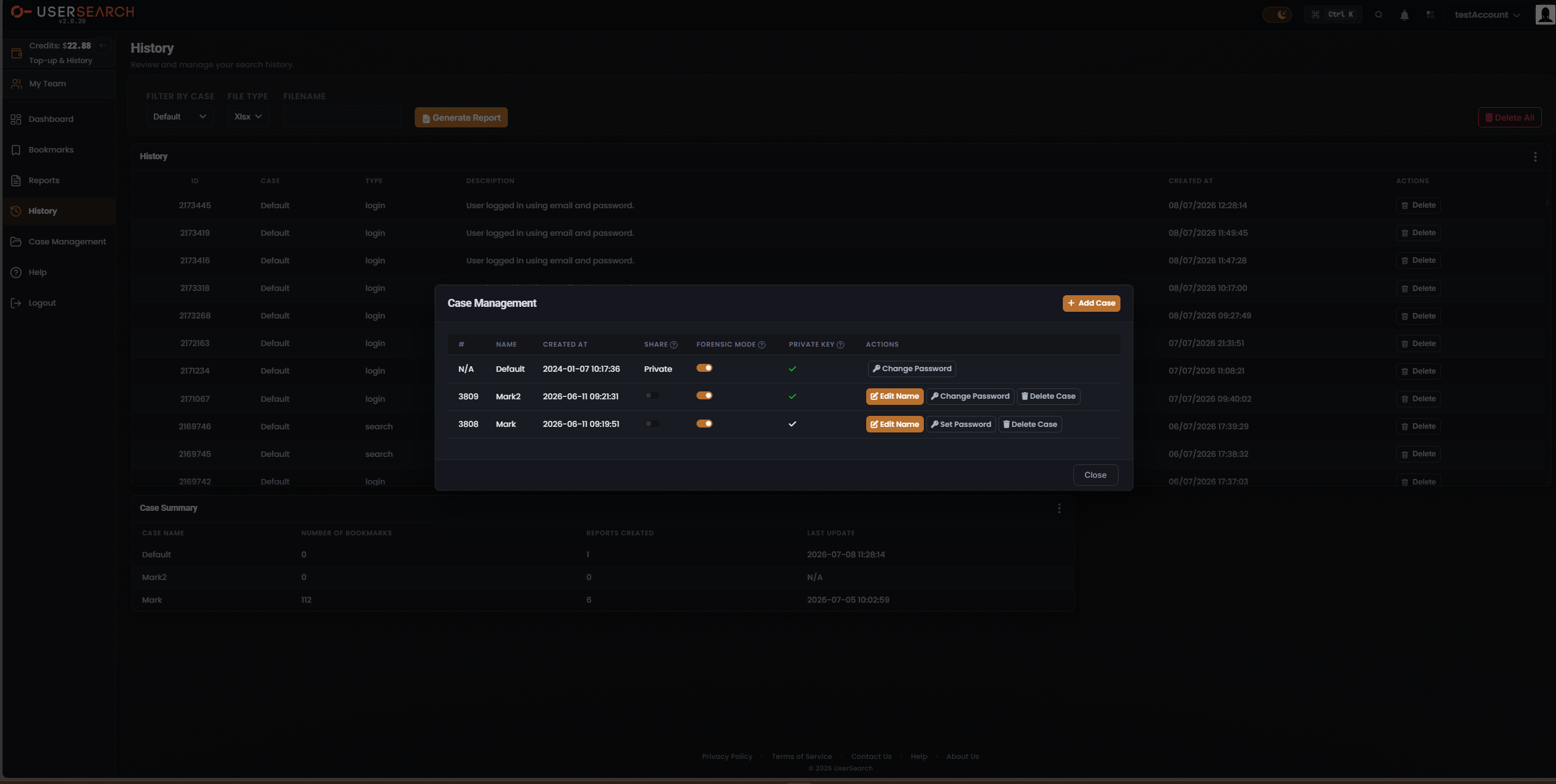
- Per-Case switch. Each Case has its own FORENSIC MODE switch in the FORENSIC MODE column of the Case Management modal. In the captured state, every Case row shows this switch in the on (orange) position.
- Header control. A Forensic Mode control is also present in the Dashboard header across all view modes.
The FORENSIC MODE column
Section titled “The FORENSIC MODE column”In the Case Management modal, FORENSIC MODE is one column of the case table:
| # | NAME | CREATED AT | SHARE | FORENSIC MODE | PRIVATE KEY | ACTIONS |
|---|
The FORENSIC MODE header carries a ? help indicator; hovering it reveals an explanatory tooltip for the column.
In the captured state, each Case shows Forensic Mode ON:
| Case | FORENSIC MODE |
|---|---|
| Default | on (orange) |
| Mark2 | on (orange) |
| Mark | on (orange) |
How to set Forensic Mode
Section titled “How to set Forensic Mode”- Open Case Management from the left navigation.
- Locate the Case in the case table.
- Toggle the switch in that row’s FORENSIC MODE column.
Because the switch is per-Case, you set retention and chain of custody independently for each Case.
Related concepts
Section titled “Related concepts”- Cases and Case Management — the container Forensic Mode is a property of, plus the SHARE, PRIVATE KEY, and ACTIONS columns.
- Bookmarks and Reports — the saved artefacts a Forensic-ON Case retains.
- History — the search and login record a Forensic-ON Case preserves.
Verified against UserSearch v2.0.20