
Results table, counters and statuses
After you run a search, the results screen presents three header counters, a results table whose columns adapt to the Module you ran, and a set of per-row statuses. This page explains how to read each of them so you can verify a result set with confidence.
The three counters
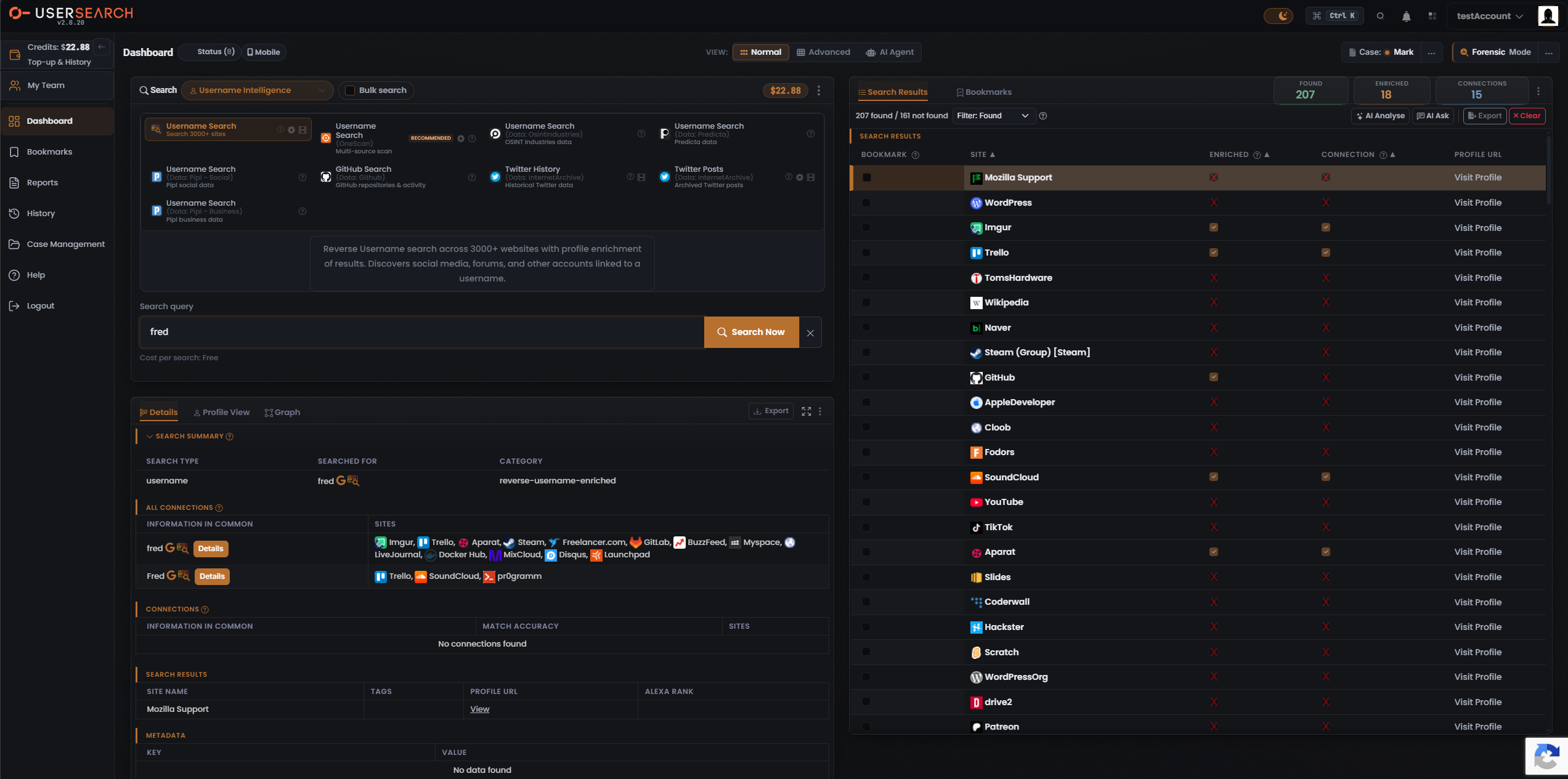
Section titled “The three counters”Every populated results header carries the same trio of counters, in this order: Found, Enriched, Connections. They count three different things and must never be used interchangeably. The trio persists across Module types even though the underlying table columns differ.
The counters are colour-coded: Found renders green, Enriched orange, Connections white.
Found means the identifier was located on a site — an account exists there. A matching profile for the searched value was found on a given site or data source (per Lee, 2026-07-08).
- In the “Search 3000+ sites” Module, the header reads Found 207, with a sub-header “207 found / 161 not found”. This Module reports both halves; the Found counter reflects only the found subset (the complementary 161 are checked sites with no match).
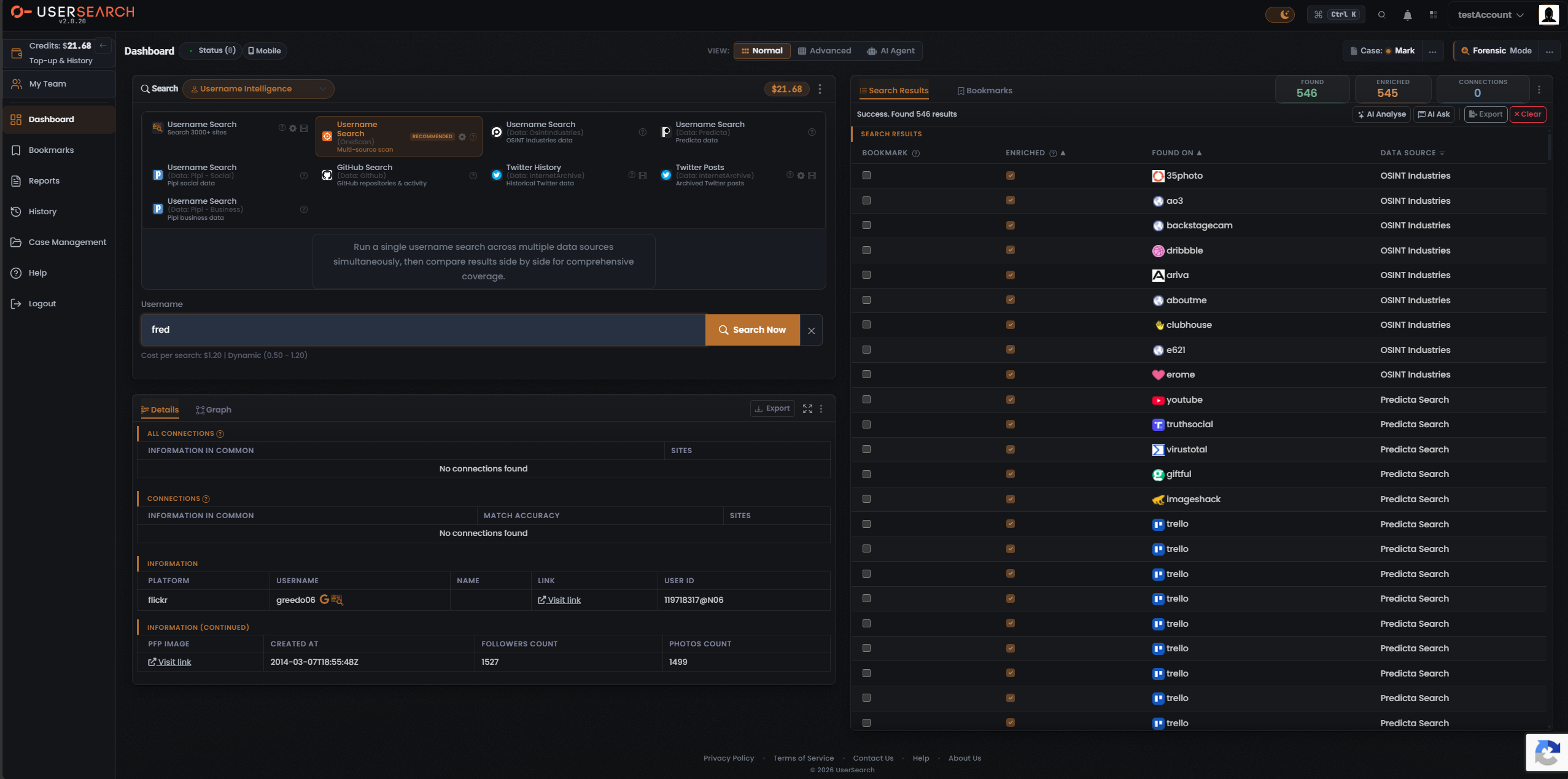
- In the OneScan Module, the header reads Found 546, with the status line “Success. Found 546 results”. This Module surfaces no separate not-found count.
Enriched
Section titled “Enriched”Enriched means UserSearch holds further metadata on that account — for example possible names, linked emails, and similar profile-level data attached to a found account (per Lee, 2026-07-08). Enriched is therefore a strict subset of Found: only found accounts can be enriched.
- “Search 3000+ sites” Module: Enriched 18 of 207 found.
- OneScan Module: Enriched 545 of 546 found.
Enrichment coverage is Module- and data source-dependent: nearly every OneScan hit is enriched (545 of 546), versus only 18 of 207 for the single-site sweep.
Connections
Section titled “Connections”Connections counts relationships surfaced between entities — linked-account clusters rather than raw site hits.
- “Search 3000+ sites” Module: Connections 15.
- OneScan Module: Connections 0 — the connections count can be zero even on a high-hit result set (546 found).
The results table
Section titled “The results table”The right-hand results component has two tabs at its top-left: Search Results (active in all captured states) and Bookmarks. A “SEARCH RESULTS” section label sits directly above the table header row.
Header controls
Section titled “Header controls”- The Found / Enriched / Connections counter tiles are pinned top-right, alongside a vertical three-dot overflow menu (its contents are not yet documented).
- Sub-header / status row:
- “Search 3000+ sites”: the text “207 found / 161 not found”, a Filter control labelled Filter: Found with a dropdown caret, and a help ? icon. The Filter narrows the visible rows.
- OneScan: a status message “Success. Found 546 results”; no Filter control is visible in that state.
- Action buttons, right of the sub-header row, in order: AI Analyse, AI Ask, Export, Clear.
- AI Analyse runs an AI analysis over the result set.
- AI Ask opens an AI question interface scoped to the results.
- Export downloads the current results.
- Clear empties the current results set.
Columns adapt to the Module
Section titled “Columns adapt to the Module”The results table adapts its columns to the Module that produced the results. Two column sets have been observed.
Search 3000+ sites Module
Section titled “Search 3000+ sites Module”Columns: Bookmark · Site · Enriched · Connection · Profile URL.
| Column | What it holds |
|---|---|
| Bookmark | A per-row checkbox that bookmarks the result. |
| Site | The site’s favicon plus its name (for example Mozilla Support, WordPress, Imgur, Trello, GitHub, SoundCloud, YouTube, TikTok). |
| Enriched | A per-row status flag: a check (positive) or a red X (negative). |
| Connection | A per-row status flag: a check or a red X. Independent of Enriched. |
| Profile URL | A Visit Profile link that opens the external profile page for that site. |
The Site, Enriched and Connection headers carry sort arrows; the Bookmark, Enriched and Connection headers carry a help ? icon. The first row is highlighted/selected and drives the Details panel below.
OneScan multi-source Module
Section titled “OneScan multi-source Module”Columns: Bookmark · Enriched · Found On · Data Source (no Site, Connection or Profile URL columns).
| Column | What it holds |
|---|---|
| Bookmark | A per-row checkbox that bookmarks the result. |
| Enriched | A per-row status flag; every visible cell is a check, consistent with the Enriched 545 / Found 546 counters. |
| Found On | The platform where the match sits (for example 35photo, ao3, dribbble, aboutme, clubhouse, youtube, truthsocial, trello). |
| Data Source | The data source behind each hit. Observed values are OSINT Industries (upper rows) and Predicta Search (lower rows) — the third-party data sources that OneScan aggregates. |
A vertical scrollbar in both frames indicates more rows exist below the viewport.
Per-row statuses
Section titled “Per-row statuses”Within a row, the Enriched and Connection cells are boolean status flags — a check for positive, a red X for negative. They are independent of each other:
- Some rows (for example Imgur, Trello, SoundCloud, Aparat) show a check in both.
- Some rows show an Enriched check but a Connection X (for example GitHub).
- Some rows show an X in both (for example Mozilla Support, WordPress).
Read each flag on its own: a positive Enriched flag does not imply a positive Connection flag, and vice versa.
Verified against UserSearch v2.0.20