
Wireless device modules & options
The Wireless Device search type exposes six Modules in the captured build. Each Module is a card in the grid that runs one lookup against the same data source — WiGLE. Wireless Device runs entirely on WiGLE, so your choice is which lookup, not which data source. Selection is single-select: the active tile carries a coral-orange border and title.
For the composer flow that surrounds these Modules, see Wireless device search: overview; for reading what comes back, see Reading Wireless device results. The data source behind every Module is WiGLE.
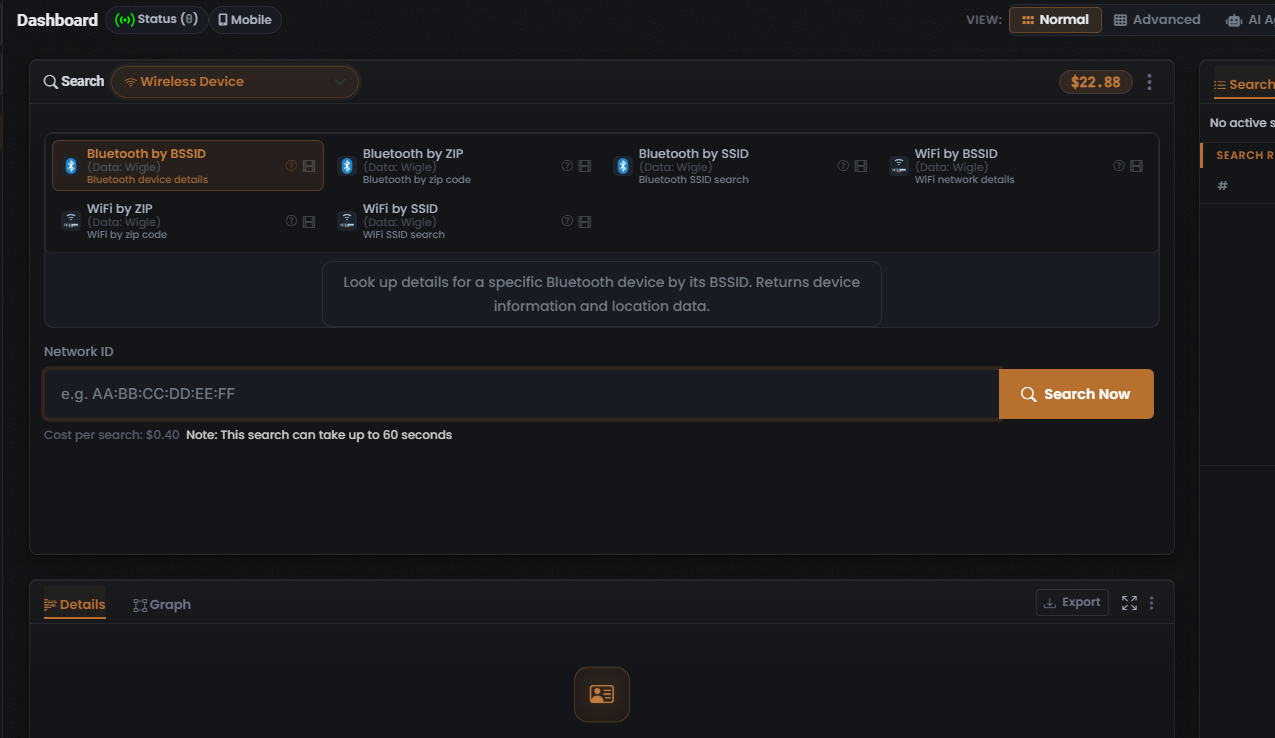
The six Modules
Section titled “The six Modules”Every Module below runs against WiGLE — the column is omitted because it never varies. The choice between them is which lens you put on WiGLE’s wardriving data: a specific device or network (by network ID), a network name (by SSID), or an area (by ZIP), across either Bluetooth or WiFi.
| Module (as shown on the tile) | What it searches | Input | Cost |
|---|---|---|---|
| Bluetooth by BSSID (selected by default) | A Bluetooth device’s details and recorded location, by its network ID | Network ID (BSSID/MAC) | $0.40 (fixed) |
| Bluetooth by ZIP | Bluetooth devices WiGLE recorded in a ZIP area | ZIP (area) (inferred) | Not captured |
| Bluetooth by SSID | Bluetooth devices matching a network name | SSID (network name) (inferred) | Not captured |
| WiFi by BSSID | A WiFi network’s details, by its network ID | Network ID (BSSID/MAC) (inferred) | Not captured |
| WiFi by ZIP | WiFi networks WiGLE recorded in a ZIP area | ZIP (area) (inferred) | Not captured |
| WiFi by SSID | WiFi networks matching a network name | SSID (network name) (inferred) | Not captured |
The lead Module: Bluetooth by BSSID
Section titled “The lead Module: Bluetooth by BSSID”Bluetooth by BSSID is pre-selected when you open the search type. Use it to pull a Bluetooth device’s details — and its recorded location — from WiGLE by its network ID.
- Input: a network ID in BSSID/MAC format.
- Cost: the line beneath the input reads $0.40 — a fixed per-search charge.
- Result: any matches are marked Found, and the results table’s Data Source column shows WiGLE.
- Timing: the panel notes this search can take up to 60 seconds to return.
The other Modules — choosing a different lens
Section titled “The other Modules — choosing a different lens”Switch Modules when your starting identifier is not a Bluetooth network ID. Each is the same WiGLE search shaped for a different radio and a different kind of identifier:
- WiFi by BSSID — look up a WiFi network’s details by its network ID (BSSID/MAC) instead of a Bluetooth device.
- Bluetooth by SSID / WiFi by SSID — start from a network name (SSID) rather than a network ID.
- Bluetooth by ZIP / WiFi by ZIP — sweep a ZIP area for the Bluetooth devices or WiFi networks WiGLE has recorded there.
Selecting a different Module changes the input field and may change the Cost per search. Because only the default Module’s cost and input are confirmed, check both on-screen each time you switch.
No OneScan, no data-source choice
Section titled “No OneScan, no data-source choice”Per-tile controls
Section titled “Per-tile controls”Each Module tile shows a data-source icon, a bold title, and a short descriptor, and tiles typically carry a circular ”?” help icon and, on some, a film-strip (tutorial/video) icon.
Related: Wireless device search: overview · Reading Wireless device results · WiGLE · Data sources & integrations
Verified against UserSearch v2.0.20