
Cyber & hosts search: overview
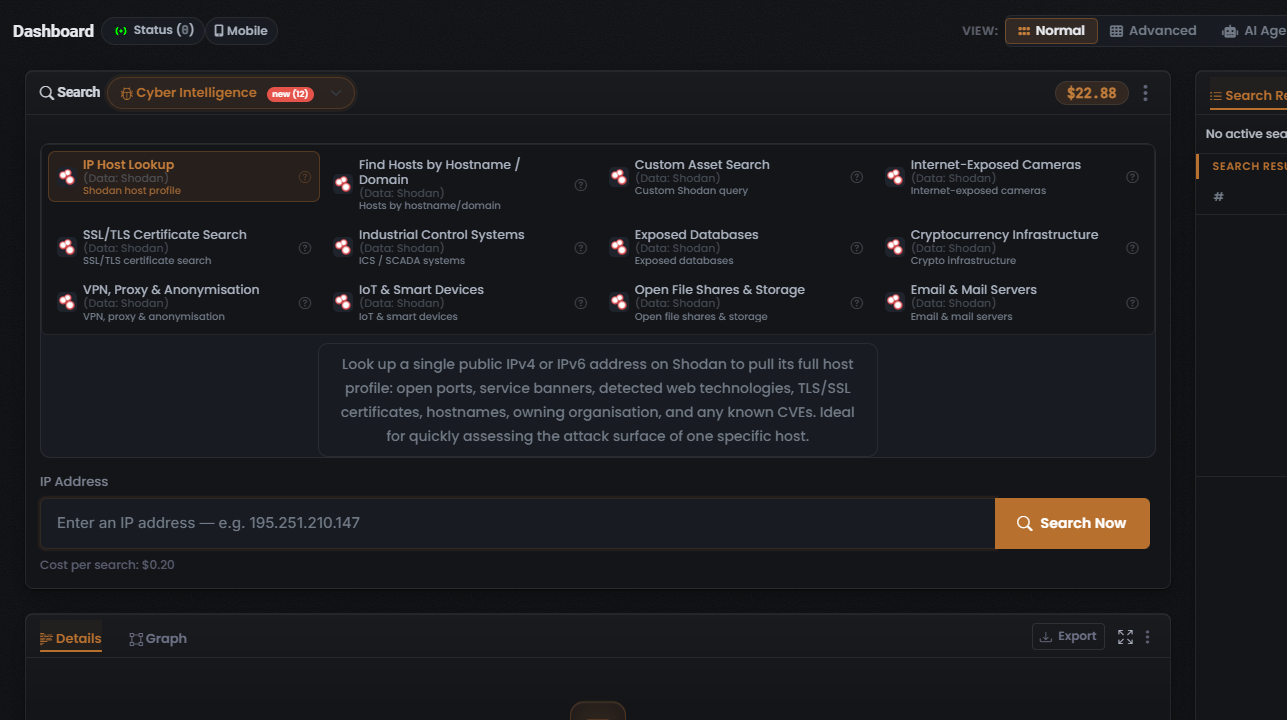
The Cyber & hosts search type — shown as Cyber Intelligence in the composer — takes an infrastructure identifier and profiles what that host, asset, or device exposes to the public internet: open ports, service banners, detected technologies, TLS certificates, and known vulnerabilities. Reach for it when your lead is a piece of infrastructure — an IP address, a hostname or domain, a TLS certificate, or a Shodan-style query — rather than a username, email, phone number, or image.
Unlike most search types, Cyber & hosts is single-data-source: every Module runs against one data source — Shodan. Your choice here is therefore which lookup — which lens on the same Shodan scan data — not which data source. See Shodan for the data source itself.
When to use it
Section titled “When to use it”Reach for Cyber & hosts when you hold an infrastructure identifier and want to:
- Profile a single address — build a full host profile for one IPv4/IPv6 address (the IP Host Lookup Module, the lead Module).
- Pivot from a name to its hosts — find the hosts behind a hostname or domain (the Find Hosts by Hostname / Domain Module).
- Write your own query — run a custom Shodan query over exposed assets (the Custom Asset Search Module).
- Hunt a class of exposed system — cameras, industrial control systems, databases, crypto infrastructure, VPN/proxy nodes, IoT devices, open file shares, or mail servers (the matching device/asset Module).
- Investigate a certificate — search TLS/SSL certificate records (the SSL/TLS Certificate Search Module).
This search type exposes twelve Modules, all backed by Shodan. For the full breakdown of each — what it searches, its input, and its cost — see Cyber & hosts modules & options.
The end-to-end flow
Section titled “The end-to-end flow”Cyber & hosts follows the same search composer flow as every other search in UserSearch — see How UserSearch works for the general model.
- In the composer header, open the Search type selector and choose Cyber Intelligence. The active search type is drawn in the coral-orange accent colour.
- Pick a Module from the grid. The grid is single-select: the chosen tile is drawn with a coral-orange border, and selecting one deselects the others. Selecting a tile loads its description, its Cost per search line, and its query form. IP Host Lookup is the default (lead) Module.
- Enter your identifier in the query field. For the default Module this is a target IP address (IPv4 or IPv6); switching Modules changes the expected input.
- Confirm the Cost per search line beneath the input. With IP Host Lookup selected it reads $0.20.
- Select Search Now (the coral-orange button with a magnifier icon) to run the query.
What it costs
Section titled “What it costs”Every Module shows its price on a Cost per search line, denominated in Credits and drawn from your main (Global) search-credits pool. Because each Module runs against a single data source, the pricing class here is fixed — there is no dynamic OneScan cost in this search type.
- IP Host Lookup — $0.20 (fixed).
- Find Hosts by Hostname / Domain — $0.20 (fixed, observed 2026-07-10).
- The other ten Modules — cost not captured. Do not assume they also cost $0.20; always read the Cost per search line shown on the tile before you run.
See Credits & pricing for the full cost model.
What you get back
Section titled “What you get back”Running a search populates the Search Results panel on the right, with the standard header counters — Found (green), Enriched (orange), and Connections (white) — over a results table whose columns adapt to the Module you ran, plus a Details panel for the selected row. Because every Module runs against Shodan, the results table’s Data Source column reads Shodan for whatever you run here.
For how to read and verify those results, see Reading Cyber & hosts results and the general concept Found, Enriched & Connections.
Related: Cyber & hosts modules & options · Reading Cyber & hosts results · Shodan · Credits & pricing
Verified against UserSearch v2.0.20