
Credits and pricing reference
Every search in UserSearch is metered in Credits. This page explains what Credits are, the two pools they live in, the three cost types a search can carry, and the per-Search type costs observed in the product.
Credits: the usage currency
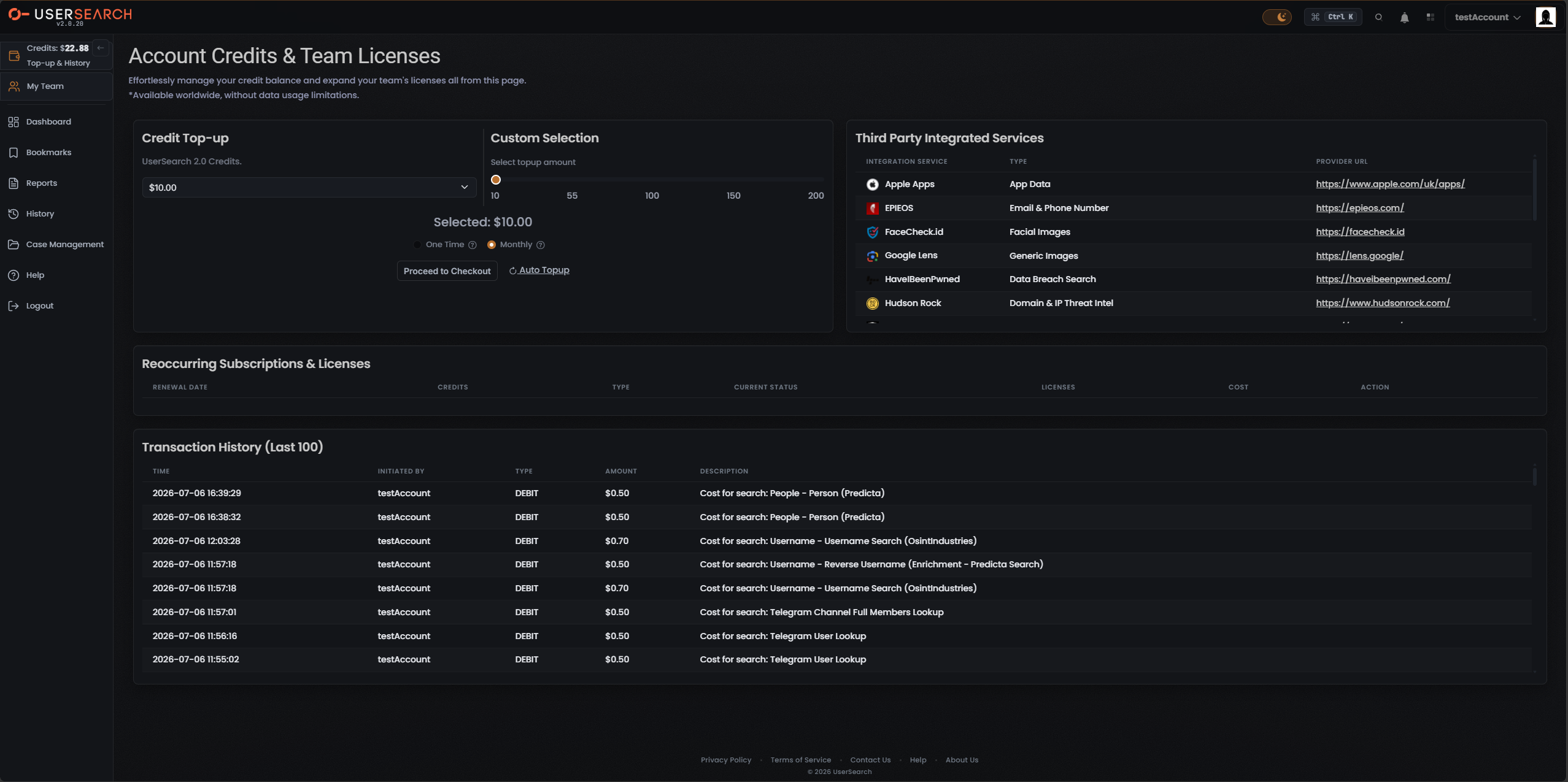
Section titled “Credits: the usage currency”Credits are UserSearch’s prepaid usage currency. Every search costs zero or more Credits, deducted from a running balance shown in the top bar and topped up on the Account Credits & Team Licenses page.
Credits are displayed with a currency symbol ($) rather than an abstract point count, and
search charges in your transaction log are likewise shown as dollar amounts (for example
$0.50 or $0.70).
Two separate credit pools
Section titled “Two separate credit pools”There are two independent credit pools, topped up and spent separately (per Lee, 2026-07-08):
- the main Global search-credits pool — the balance shown in the top bar and labelled UserSearch 2.0 Credits in the top-up panel; and
- the S.A.R.G.E. pool, used by the AI Agent feature.
Ordinary searches draw down the Global pool; S.A.R.G.E. usage draws down its own pool.
The three cost types
Section titled “The three cost types”Per-search pricing uses a closed set of three cost types:
| Cost type | Meaning |
|---|---|
| free | 0 Credits. |
| fixed | A set Credit amount. single-source Modules and Search type searches such as Vehicle are fixed-price (per Lee, 2026-07-08). |
| dynamic | A variable amount shown as a range. A OneScan search costs the sum of every data source left selected in its Choose Data Source modal, so its displayed range moves as data sources are toggled on or off (per Lee, 2026-07-08). |
A OneScan Module is the recommended multi-source Module in a Search type; it is always
dynamic. As an observed example, the Username OneScan shows $1.20 | Dynamic (0.50 – 1.20),
where the $1.20 total is Predicta ($0.50) plus OSINT Industries ($0.70) with both data sources
selected.
Per-Search type cost reference
Section titled “Per-Search type cost reference”The table below lists the cost observed on-screen for each Search type’s selected lead Module.
| Search type | Lead Module | Cost type | Observed cost |
|---|---|---|---|
| Username Intelligence | Username Search (3000+ sites) | free | Free |
| Email Intelligence | Reverse-Email (Fast) | free | Free |
| Phone Intelligence | Background Check (US) | fixed | $0.40 |
| People Intelligence | Person (Pipl – Social) | fixed | $1.00 |
| Corporate Intelligence | Company Search (OpenCorporates) | fixed | $0.50 |
| Cyber Intelligence | IP Host Lookup | fixed | $0.20 |
| Product Intelligence | Product Trends (Google Trends) | free | Free |
| Chat Messaging | Telegram Chat Messages (TelemetryApp) | fixed | $0.50 |
| Public Forums | Reddit User (Intel AI) | fixed | $0.20 |
| Picture | Fake Image Check | free | Free |
| Cryptocurrency | Address Lookup | free | Free |
| Vehicle Lookup | Vehicle Lookup (UK Only, Enriched) | fixed | $5.00 |
| Threat Intelligence | Computer/IP Threat (HudsonRock) | free | Free |
| Wireless Device | Bluetooth by BSSID | fixed | $0.40 |
| Website Forensics | Website Domain Ownership (by Domain) | free | Free |
| Public Leaks | Public Leaks (IntelX) | fixed | $0.20 |
| Court Records | Court Records (OneScan) | dynamic | $0.60 (range $0.12 – $0.60) |
OneScan (dynamic) Modules
Section titled “OneScan (dynamic) Modules”Seven Search types offer a OneScan Module. Because a OneScan total is the sum of the selected data sources, its cost is always a range. Two ranges have been observed:
| Search type | OneScan cost |
|---|---|
| Username Intelligence | $1.20 (range $0.50 – $1.20) |
| Court Records | $0.60 (range $0.12 – $0.60) |
| Email Intelligence | Dynamic (range not captured) |
| Phone Intelligence | Dynamic (range not captured) |
| People Intelligence | Dynamic (range not captured) |
| Picture | Dynamic (range not captured) |
| Public Leaks | Dynamic (range not captured) |
To see and adjust a OneScan’s cost, open its Choose Data Source modal (the gear on the Module card) and toggle data sources; the displayed range updates to the sum of those left selected.
How charges appear
Section titled “How charges appear”Running a search creates a DEBIT entry in Transaction History on the Account Credits &
Team Licenses page, capped to the last 100 entries. Each row records the time, who initiated
it, the type (DEBIT), the amount, and a description naming the Search type and Module — for
example Cost for search: Username - Username Search (OsintIndustries) at $0.70.
Topping up
Section titled “Topping up”You add Credits to the Global pool on the Account Credits & Team Licenses page:
- Set an amount using the Credit Top-up dropdown (preset amounts) or the Custom Selection slider, which spans 10–200.
- Choose One Time for a single purchase or Monthly for a recurring top-up.
- Select Proceed to Checkout to complete payment.
An Auto-topup control sits beside the checkout button; it configures automatic recurring top-ups when your balance runs low.
Teams and shared credits
Section titled “Teams and shared credits”Accounts are either single or team (per Lee, 2026-07-08):
- Single accounts do not share; Cases and Credits belong to the one user.
- Team accounts share Cases and draw on one common pool of Global Credits, controlled by a team leader. Every team member spends from the same shared balance.
Verified against UserSearch v2.0.20