
People search: overview
The People Intelligence search type takes what you know about a person — a name, phone number, email, username, location, VIN, or age range — and searches people-data sources for a matching individual, returning social profiles and personal information where a source holds them. It is the search type to reach for when your lead is a person rather than a single bare identifier, and when you can combine several partial details into one query.
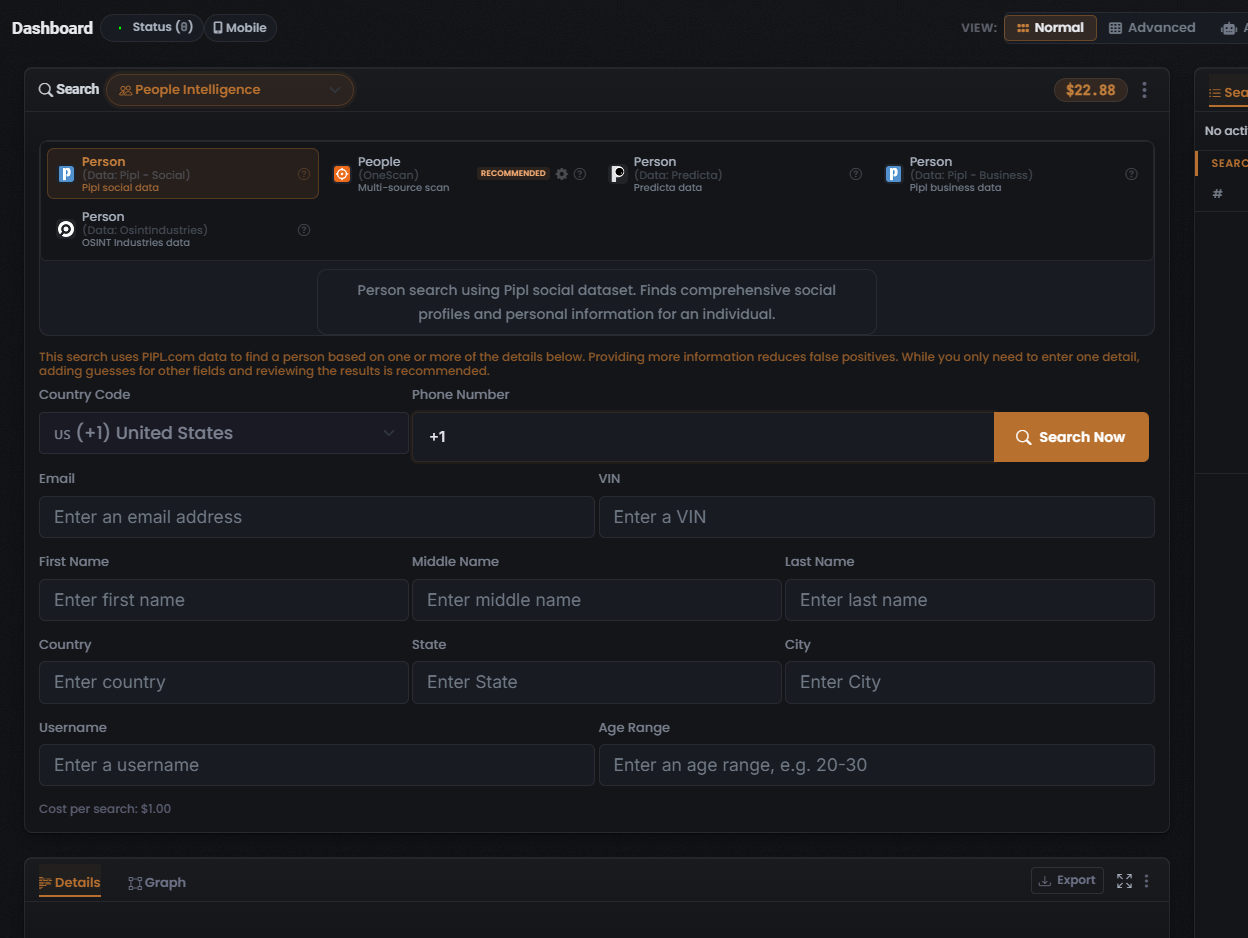
When to use it
Section titled “When to use it”Reach for People Intelligence when you hold one or more details about a person and want to:
- Combine partial details into one lookup — enter any mix of name, phone, email, location, username, VIN, or age range on a single multi-field form and let the data source resolve the person. Providing more fields reduces false positives.
- Fan the same person query across several data sources at once and compare what each returns (the People (OneScan) Module — badged RECOMMENDED).
- Query one people-data source directly — Pipl (Social or Business), Predicta, or OSINT Industries (the single-source Modules).
This search type exposes five Modules. For the data source, cost, and returned data of each, see People modules & options.
The end-to-end flow
Section titled “The end-to-end flow”People Intelligence follows the same search composer flow as every other search type in UserSearch — see How UserSearch works for the general model.
- In the composer header, open the Search type selector and choose People Intelligence (shown with a people icon). The active search type is drawn in the coral-orange accent colour.
- Pick a Module from the grid. Selection is single-select: the chosen tile carries a coral-orange border, and selecting one deselects the others. Selecting a tile loads its description, its query form, and its Cost per search line. People (OneScan) is badged RECOMMENDED.
- (Optional) configure the data source. The People (OneScan) Module carries a gear icon that opens a Choose Data Source modal, where you toggle which data sources run (and set the dynamic cost). See People modules & options.
- Fill the multi-field person form. Enter any combination of the captured fields — Country Code, Phone Number, Email, VIN, First / Middle / Last Name, Country / State / City, Username, and Age Range. You only need one, but more detail reduces false positives.
- Confirm the Cost per search line, then select Search Now (the coral-orange button with a magnifier icon).
What it costs
Section titled “What it costs”Every Module shows its price on a Cost per search line, denominated in Credits drawn from your main (Global) search-credits pool (the balance pill read $22.88 in the captured frame). UserSearch uses three cost tiers — Free, Fixed, and Dynamic (per Lee, 2026-07-08). In People Intelligence:
- Fixed — a single set amount. The selected Person (Data: Pipl - Social) Module reads Cost per search: $1.00.
- Dynamic — the charge is the sum of the data sources left toggled on. People (OneScan) is the dynamic-cost Module.
- Free — no People Module was captured as free.
See Credits & pricing for the full cost model.
What you get back
Section titled “What you get back”Running a search populates the Search Results panel on the right, with the standard header counters — Found (green), Enriched (orange), and Connections (white) — over a results table whose columns adapt to the Module you ran, plus a Details panel for the selected row. In the captured frame the results panel was still empty (“No activity”); no populated People result set has been captured.
For how to read and verify those results, see Reading People results and the general concept Found, Enriched & Connections.
Related: People modules & options · Reading People results · OneScan · Credits & pricing
Verified against UserSearch v2.0.20