
Product intelligence modules & options
The Product Intelligence search type exposes seven Modules in the captured build: Product Trends, Trending Now, Scholar Search, Events, Patents, Ad Creatives and Apple Apps. Each is a single-purpose Module running against one data source — this search type does not offer OneScan. For the composer flow that surrounds these Modules, see Product intelligence search: overview.
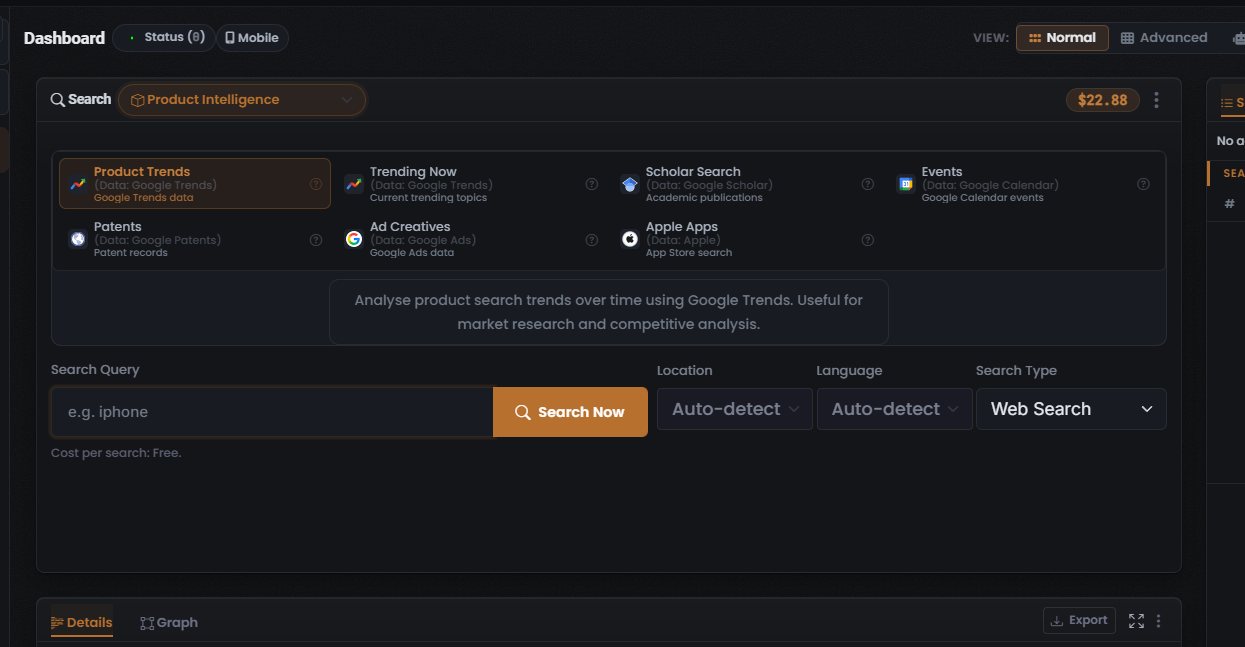
The Modules
Section titled “The Modules”Each tile shows the Module name, its data source as a “(Data: …)” sub-label, and a short descriptor. Only the default Product Trends Module was captured in its selected state, so it is the only Module whose full description panel, input options and Cost per search value were observed.
| Module | data source | Cost | What it returns |
|---|---|---|---|
| Product Trends (selected/lead Module) | Google Trends | Free (0 Credits) | Product search-trend analysis over time |
| Trending Now | Google Trends | Not captured — see caution | Current trending topics |
| Scholar Search | Google Scholar | Not captured — see caution | Academic publications |
| Events | Google Calendar | Not captured — see caution | Google Calendar events |
| Patents | Google Patents | Not captured — see caution | Patent records |
| Ad Creatives | Google Ads | Not captured — see caution | Google Ads creative data |
| Apple Apps | Apple | Not captured — see caution | App Store listings |
Product Trends
Section titled “Product Trends”Product Trends is the lead Module and is shown selected when the search type is captured. Its tile is drawn with a coral-orange highlighted border. On screen it is labelled Product Trends (Data: Google Trends) with the sub-label “Google Trends data”.
- Description panel: “Analyse product search trends over time using Google Trends. Useful for market research and competitive analysis.”
- Input: a Search Query field with the placeholder
e.g. iphone, plus three dropdowns beside it — Location (captured default Auto-detect), Language (captured default Auto-detect) and Search-Type (labelled Search Type on screen, captured default Web Search). - Cost: the line beneath the input reads “Cost per search: Free” — the Module consumes no Credits per search.
- Data source: Google Trends.
Trending Now
Section titled “Trending Now”Trending Now is labelled Trending Now (Data: Google Trends) with the sub-label “Current trending topics”. It returns current trending topics via Google Trends.
Scholar Search
Section titled “Scholar Search”Scholar Search is labelled Scholar Search (Data: Google Scholar) with the sub-label “Academic publications”. It returns academic publications via Google Scholar.
Events
Section titled “Events”Events is labelled Events (Data: Google Calendar) with the sub-label “Google Calendar events”. It returns events via Google Calendar.
Patents
Section titled “Patents”Patents is labelled Patents (Data: Google Patents) with the sub-label “Patent records”. It returns patent records via Google Patents.
Ad Creatives
Section titled “Ad Creatives”Ad Creatives is labelled Ad Creatives (Data: Google Ads) with the sub-label “Google Ads data”. It returns Google Ads creative data via Google Ads.
Apple Apps
Section titled “Apple Apps”Apple Apps is labelled Apple Apps (Data: Apple) with the sub-label “App Store search”. It returns App Store listings via Apple.
The data sources behind the Modules
Section titled “The data sources behind the Modules”Every Product Intelligence Module names its data source in its tile sub-label, as “(Data: …)”. Unlike some search types where the data source was not captured, all six data sources here are captured on screen, and each has an integration page:
| Module | data source | Integration page |
|---|---|---|
| Product Trends | Google Trends | Google Trends |
| Trending Now | Google Trends | Google Trends |
| Scholar Search | Google Scholar | Google Scholar |
| Events | Google Calendar | Google Calendar |
| Patents | Google Patents | Google Patents |
| Ad Creatives | Google Ads | Google Ads |
| Apple Apps | Apple | Apple App Store |
For how Modules map to data sources in general, see How UserSearch works and the data-source integrations index.
OneScan and per-search options
Section titled “OneScan and per-search options”Per-tile controls
Section titled “Per-tile controls”Each non-selected Module tile carries a help (?) icon that opens Module-specific help.
See also: Product intelligence search: overview and Reading Product intelligence results.
Verified against UserSearch v2.0.20