
Pivot an identity across entities
Searches rarely stop at a single identifier. You start with one thing you know — a username, an email, a phone number, an image — and you follow what each search surfaces to reach the next entity. This guide explains how pivoting works in UserSearch: the core loop, the affordances that let you pivot from a result, and a routing table of what you can reach from each entity type.
What a pivot is
Section titled “What a pivot is”A pivot is moving from one entity to a related one by following a Connection surfaced by a search. The investigative core loop is:
search → enrich → pivot — run a Module against an input entity, let Enrichment expand the Found records with extra metadata, then take one of those newly-surfaced values and search it in another Module or Search type.
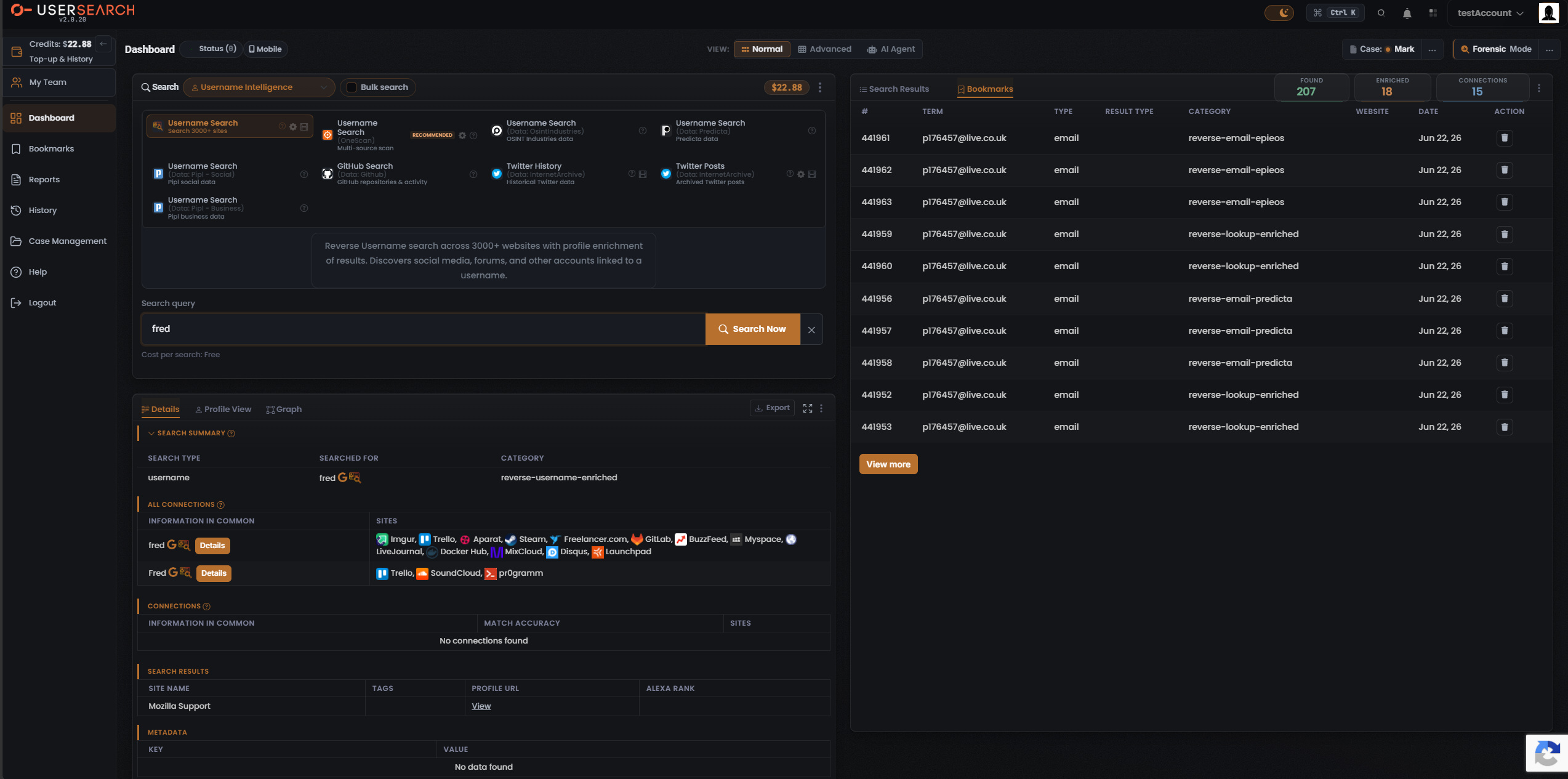
Two facts anchor how pivots appear (per Lee, 2026-07-08):
- Found means the identifier was located on a site — an account exists there.
- Enriched means UserSearch holds further metadata on that account — e.g. possible names or linked emails.
Enriched fields are the raw material for a pivot. A name or a linked email surfaced by enrichment becomes the next entity you feed back into the map.
The ways to pivot in the UI
Section titled “The ways to pivot in the UI”1. Re-search across Search types (the manual pivot)
Section titled “1. Re-search across Search types (the manual pivot)”Take a value you obtained from one search — for example an email surfaced while enriching a username — and enter it as the input to a different Search type / Module. This is the workhorse pivot, and the reason the routing table below is organised by input entity. No special control is required: it is the ordinary act of running a second Search.
2. The Google “G” dork icon
Section titled “2. The Google “G” dork icon”A multicolour Google “G” icon sits next to a searched term — in the SEARCH SUMMARY beside the searched value, in each ALL CONNECTIONS row, and in the OneScan INFORMATION row. Clicking it opens Google with a preset dork for that value (per Lee, 2026-07-08). This is a pivot out of the platform into an external Google search, not an internal re-search.
3. The AI Agent (S.A.R.G.E.) as a pivot accelerator
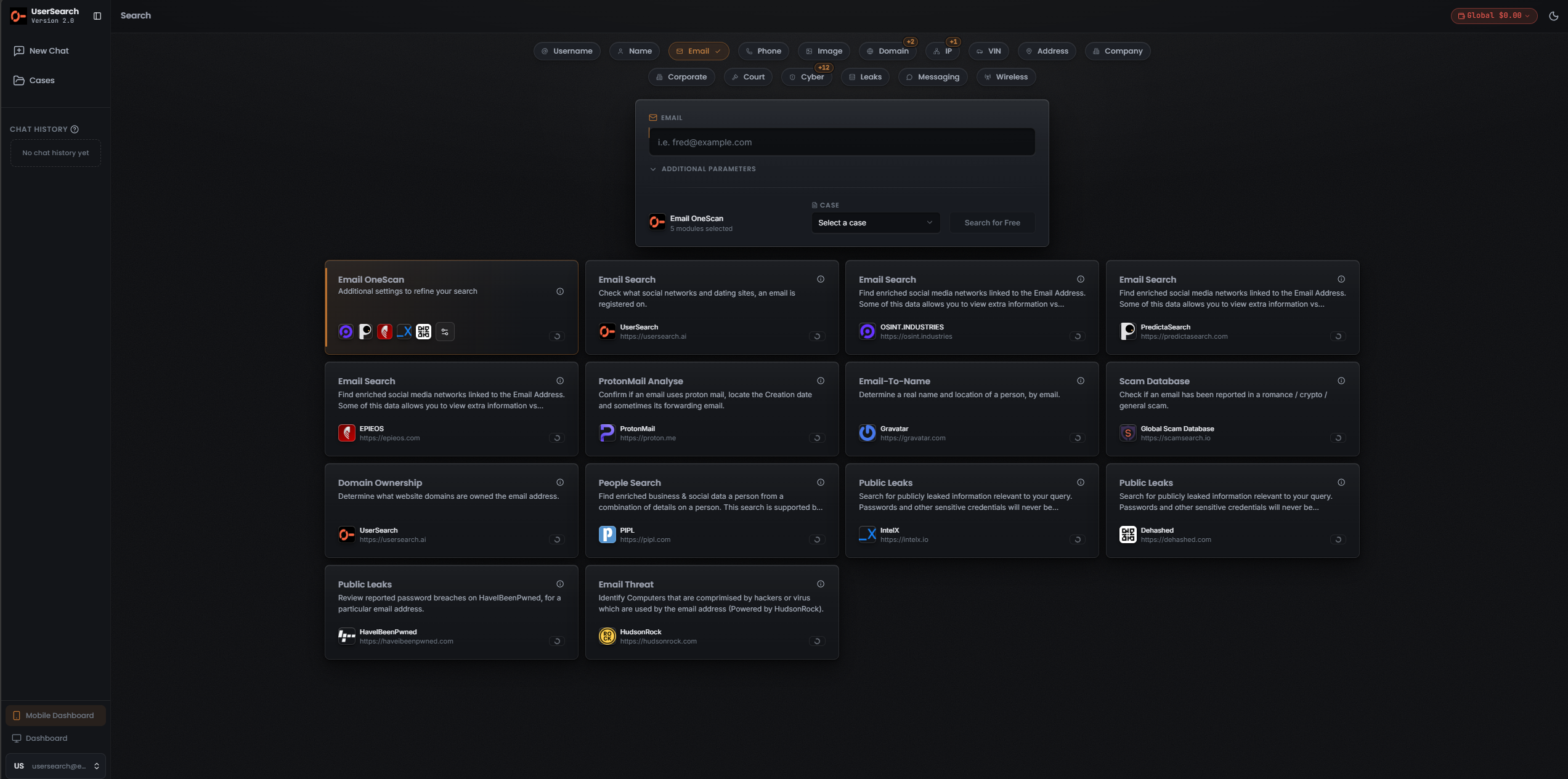
Section titled “3. The AI Agent (S.A.R.G.E.) as a pivot accelerator”The AI Agent exposes a row of entity-type pills — Username, Name, Email, Phone, Image, Domain, IP, VIN, Address, Company — plus Search type pills, and lets you multi-select Modules. It can chain several pivots conversationally rather than card-by-card. S.A.R.G.E. is a documented feature despite its experimental label (per Lee, 2026-07-08).
Reading Connections before you pivot
Section titled “Reading Connections before you pivot”When you pivot from a result, the platform’s own view of related entities lives in the Connections counter and the connection sub-sections of the Details panel.
- Found counts how many accounts were located.
- Enriched counts how many of those you hold extra metadata on (a subset of Found).
- Connections counts relationships drawn between entities — linked-account clusters rather than raw site hits.
In the captured Details panel, the ALL CONNECTIONS table groups sites by the exact matched value (including case), so a search for fred can produce separate fred and Fred clusters, each listing the sites that share that value and each carrying the pivot icons and a coral Details button.
The distinct CONNECTIONS table adds a Match Accuracy column.
The pivot routing table
Section titled “The pivot routing table”Every row below is a captured (observed) Search type → Module path unless marked otherwise. Rows marked enrich rely on Lee’s Found/Enriched definition (2026-07-08); the specific enriched fields returned in any given run have not been captured, so treat those onward entities as available in principle rather than guaranteed for a particular search.
From a username
Section titled “From a username”| You can reach | Via Search type → Module |
|---|---|
| Accounts on 3000+ websites | Username Intelligence → Username Search (Search 3000+ sites) |
| A merged multi-source footprint | Username Intelligence → Username Search (OneScan) [RECOMMENDED] |
| GitHub repositories & activity | Username Intelligence → GitHub Search |
| Historical / archived Twitter data | Username Intelligence → Twitter History, Twitter Posts |
| Reddit profile, history, insights | Public Forums → Reddit User + Reddit modules |
| Telegram user/channel details | Chat Messaging → Telegram User Lookup / Channel Lookup |
| Possible names & linked emails (enrich) | Enrichment of the above |
From an email
Section titled “From an email”| You can reach | Via Search type → Module |
|---|---|
| Social / dating sites the email is registered on | Email Intelligence → Reverse-Email (Fast) |
| A merged multi-source footprint | Email Intelligence → Email (OneScan) [RECOMMENDED] |
| A real name and location (Email → Name) | Email Intelligence → Email-To-Name (Gravatar) |
| Domains owned (Email → Domain, reverse-WHOIS) | Email Intelligence → Domain Ownership; Website Forensics → Website Domain Ownership (by Email) |
| Breach / leak appearances | Email Intelligence → Scam Database; Public Leaks → HaveIBeenPwned / Dehashed / IntelX / OneScan |
| ProtonMail confirmation & creation date | Email Intelligence → ProtonMail Analyse |
| Phone / address / username (enrich) | Enrichment / People form cross-fields |
From a phone number
Section titled “From a phone number”| You can reach | Via Search type → Module |
|---|---|
| Identity, address history, public records (US) | Phone Intelligence → Background Check (US) |
| A merged multi-source footprint | Phone Intelligence → Phone (OneScan) [RECOMMENDED] |
| A person record (name, email, address) | People Intelligence → Person modules (Phone lead field) |
From a person / name
Section titled “From a person / name”The People Intelligence form is multi-field (phone, email, VIN, name, location, username, age range) and accepts many entity types as input, which makes it the convergence hub of the map: nearly every other entity can pivot into a person here.
| You can reach | Via Search type → Module |
|---|---|
| Comprehensive social profiles | People Intelligence → Person (Pipl-Social) |
| A merged multi-source record | People Intelligence → People (OneScan) [RECOMMENDED] |
| Sanctions / watchlist hits | Corporate Intelligence → Person Sanctions |
| Court records mentioning the person | Court Records → any module (free-text name) |
| Associated email / phone / username / address (enrich) | Returned fields / enrichment |
From a domain
Section titled “From a domain”| You can reach | Via Search type → Module |
|---|---|
| WHOIS ownership & contacts (Domain → Person/email) | Website Forensics → Website Domain Ownership (by Domain) |
| Historical page snapshots | Website Forensics → Website Change History |
| Sites sharing a favicon hash (Domain → Domain) | Website Forensics → Search by Favicon |
| Hosts / IPs with ports & services (Domain → IP) | Cyber Intelligence → Find Hosts by Hostname / Domain |
| Reputation / blocklist status | Threat Intelligence → Domain Reputation |
| Infostealer / compromise data | Threat Intelligence → Domain Threat |
From an IP address
Section titled “From an IP address”| You can reach | Via Search type → Module |
|---|---|
| Full host profile: ports, banners, tech, TLS, hostnames, org, CVEs (IP → Domain/org) | Cyber Intelligence → IP Host Lookup |
| Threat indicators (malware, botnets) | Threat Intelligence → Computer/IP Threat |
| Reputation / blocklist status | Threat Intelligence → IP Reputation |
From an image / face
Section titled “From an image / face”| You can reach | Via Search type → Module |
|---|---|
| Manipulation / AI-generation verdict | Picture → Fake Image Check |
| A merged multi-source scan | Picture → Image (OneScan) [RECOMMENDED] |
| Face matches across the web (Face → accounts) | Picture → Face Search |
| Geolocation of where the image was taken (Image → location) | Picture → Image Geo-location |
| Reverse-image matches | Picture → Image (TinEye) / Image (Google Lens) |
From other entities
Section titled “From other entities”| Input entity | You can reach | Via Search type → Module |
|---|---|---|
| Wallet address | Transaction history, associated websites (Wallet → Domain) | Cryptocurrency → Address Lookup, Websites by Address |
| Vehicle registration / VIN | Vehicle details; the owner as a person (Vehicle → Person) | Vehicle Lookup → Vehicle Lookup, Vehicle Owner (Pipl-Social) |
| Company | Directors, filings, structure (Company → Person) | Corporate Intelligence → Company Search, Director / Officer Search |
| Wireless identifier (BSSID / SSID / ZIP) | Device details + geolocation | Wireless Device → WiFi / Bluetooth by BSSID / ZIP / SSID |
Backbone pivots to reach for
Section titled “Backbone pivots to reach for”- Email → Name via Email-To-Name (Gravatar) — resolves an email to a real name and location.
- Email → owned domains via Domain Ownership — reverse-WHOIS from an email to the domains it registered.
- Email → breaches via Public Leaks HaveIBeenPwned / Dehashed / IntelX — exposed credentials and breach appearances.
- Username → 3000+ sites — the broadest single fan-out across social, forum, and other accounts.
- People Intelligence multi-field form — the convergence hub where phone, email, VIN, name, location, username, and age range all funnel into one person record.
A worked pivot flow
Section titled “A worked pivot flow”- Start with a username and run Username Intelligence → Username Search (OneScan).
- In the Details panel, read the Enriched records for a surfaced name or linked email.
- Click the Google “G” icon beside a value to sanity-check it externally, or copy the value.
- Feed the surfaced email into Email Intelligence → Email-To-Name (Gravatar) to resolve a real name, or into Public Leaks to check for breaches.
- Converge everything into People Intelligence — enter name, email, and any phone or username together — to build a single person record.
- Review the Connections counter and connection tables to see the links the platform drew between these entities.
Verified against UserSearch v2.0.20