
Reading Phone results
After you run a Phone search (see Phone search: overview), results populate the Search Results panel on the right. This page explains how to read and verify them. The Phone results screen uses the same results component as every other search type, so the general model in Found, Enriched & Connections and the Results table reference applies directly.
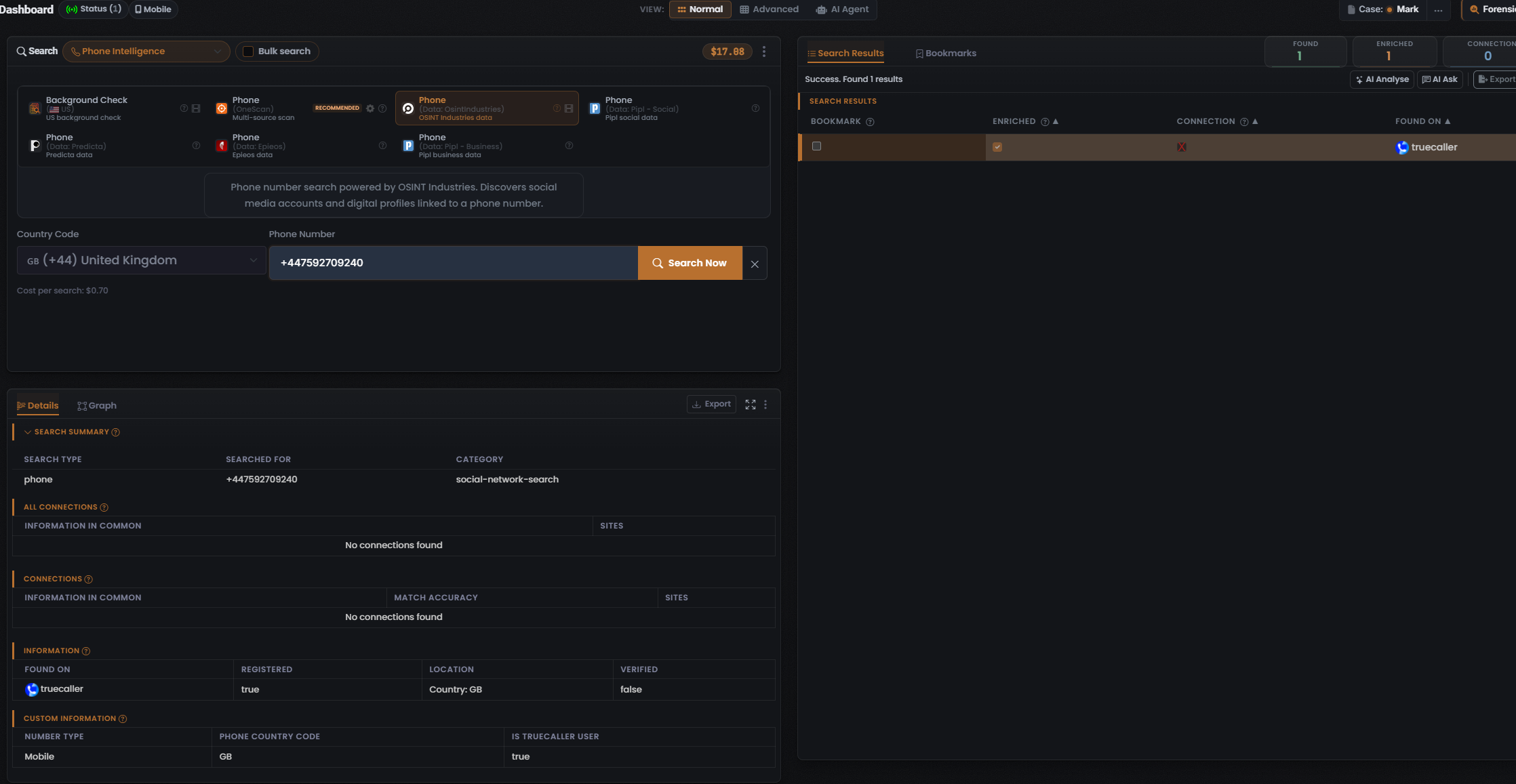
A populated Phone result has now been captured for one Module — Phone (Data: OsintIndustries) (the “OSINT Industries data” card, whose description reads “Phone number search powered by OSINT Industries. Discovers social media accounts and digital profiles linked to a phone number”; Cost per search: $0.70). The reading below is grounded in that capture. Because the table adapts its columns to the Module that produced them, another Phone Module — a Background Check or OneScan run — may show a different column set, so treat the specifics below as observed for this Module rather than a fixed Phone layout.
For this Module the composer shows a Country Code dropdown (set to GB (+44) United Kingdom in the capture) beside the Phone Number field, so the country code is chosen from the dropdown rather than typed into the number field.
The three counters
Section titled “The three counters”The results header carries three counters, always in this order. They count three different things and are never interchangeable (Found is green, Enriched orange, Connections white):
Found means the identifier was located in a data source — a matching record for the searched number exists there. In the captured Phone (Data: OsintIndustries) run the header read Found 1 (status line “Success. Found 1 results”), the single hit being truecaller.
Enriched
Section titled “Enriched”Enriched means UserSearch holds further metadata on a found record — possible names, linked accounts, addresses, and similar profile-level data. Enriched is a strict subset of Found: only found records can be enriched, and coverage is Module- and data-source-dependent. The capture read Enriched 1 — the one found record carried enrichment.
Connections
Section titled “Connections”Connections counts relationships surfaced between entities — linked-account clusters rather than raw record hits. These are intended to populate the Graph tab, and the count can be zero even on a result set; the capture read Connections 0.
The results table
Section titled “The results table”The results panel has Search Results and Bookmarks tabs. Above the table, AI Analyse, AI Ask and Export are visible in the capture; the general results model also documents a Clear control (styled red/coral) and an optional Filter.
- AI Analyse / AI Ask run AI over the result set — see AI Analyse & AI Ask.
- Export downloads the current results — see Export & reports.
- Clear empties the current results set.
For the captured Phone (Data: OsintIndustries) run the columns are Bookmark · Enriched · Connection · Found On:
- Bookmark — a per-row checkbox that bookmarks the result.
- Enriched — a per-row status flag, a check or a red X.
- Connection — a per-row status flag, a check or a red X, read independently of Enriched.
- Found On — the platform the match sits on (a favicon plus name). The single captured row was truecaller, with an Enriched check and a Connection X.
The Details panel
Section titled “The Details panel”Selecting a row drives the lower-left Details panel, which organises the result into tabs (Details and Graph) and, within Details, labelled sub-sections. For the captured run (the truecaller row selected) the sub-sections were:
- Search Summary — Search type phone, Searched for the number entered, Category social-network-search.
- All Connections — read No connections found.
- Connections — carries a Match Accuracy column, and read No connections found.
- Information — the enrichment block: Found On truecaller, Registered true, Location Country: GB, Verified false.
- Custom Information — a Module-specific block; here Number Type Mobile, Phone Country Code GB, Is Truecaller User true.
Match Accuracy (in the Connections sub-section) is set by the third-party data source, not computed by UserSearch (per Lee, 2026-07-08).
Pivoting from a result
Section titled “Pivoting from a result”Two small icons sit beside a searched term or value, implementing the investigative pivot loop (search → enrich → pivot):
- Google “G” icon — a Google-dork pivot: clicking it opens Google with a preset dork for that value (per Lee, 2026-07-08).
- Magnifier icon — the second icon beside the “G”. Like the “G” icon, it opens a Google dork query for the value (per Lee, 2026-07-10).
See The pivot.
Bookmarks
Section titled “Bookmarks”Switching the results panel to the Bookmarks tab replaces the table with a saved-results list, while the Found / Enriched / Connections counters persist. Each bookmarked row records its term, type, date, and Search type, with a delete action and a View more button to paginate. See Bookmarks.
Verifying a result
Section titled “Verifying a result”- Cross-check Enriched against Found — Enriched should never exceed Found (the capture read 1 of 1).
- Treat Match Accuracy, where present, as the data source’s own confidence, not a UserSearch computation.
- Use the Google “G” and magnifier icons — both open a Google dork for the value (per Lee, 2026-07-10) — to corroborate a hit against an independent search before you rely on it.
- For Background Check (US) data — identity, addresses, and public records — corroborate against an independent public-records source before acting on it.
Related: Phone search: overview · Phone modules & options · Found, Enriched & Connections · The pivot
Verified against UserSearch v2.0.20