
Vehicle modules & options
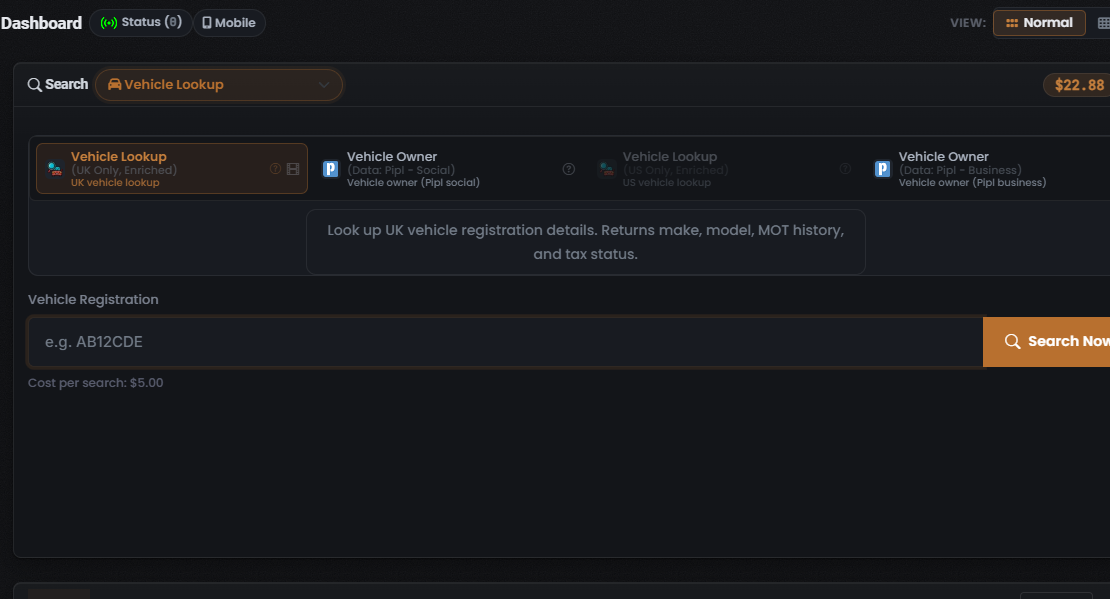
The Vehicle Lookup search type exposes four Modules in the captured build: Vehicle Lookup (UK Only, Enriched), two Vehicle Owner Modules, and Vehicle Lookup (US Only, Enriched). All four are single-purpose Modules — this search type does not offer OneScan. For the composer flow that surrounds these Modules, see Vehicle search: overview.
The Modules
Section titled “The Modules”| Module | Subtitle | Input | Cost / cost type | What it returns |
|---|---|---|---|---|
| Vehicle Lookup (UK Only, Enriched) (selected by default) | “UK vehicle lookup” | Vehicle Registration (UK-style plate) | $5.00 (fixed) | Make, model, MOT history, and tax status |
| Vehicle Owner (Data: Pipl - Social) | “Vehicle owner (Pipl social)“ | Vehicle Registration | Not captured — see caution | Registered-owner enrichment from Pipl’s Social dataset |
| Vehicle Owner (Data: Pipl - Business) | “Vehicle owner (Pipl business)“ | Vehicle Registration | Not captured — see caution | Registered-owner enrichment from Pipl’s Business dataset |
| Vehicle Lookup (US Only, Enriched) | “US vehicle lookup” | Vehicle Registration | Not captured — see caution | US vehicle registration details |
Vehicle Lookup (UK Only, Enriched)
Section titled “Vehicle Lookup (UK Only, Enriched)”Vehicle Lookup (UK Only, Enriched) is the lead Module and is pre-selected when you open the Vehicle Lookup search type. Its tile is drawn with a coral-orange highlighted border and carries a help (?) icon and a film/video (tutorial) icon.
- Description panel: “Look up UK vehicle registration details. Returns make, model, MOT history, and tax status.”
- Input: a field labelled Vehicle Registration with the placeholder
e.g. AB12CDE. The UK-style number-plate placeholder matches the Module’s UK-only scope. - Cost: the line beneath the input reads “Cost per search: $5.00” — a fixed charge (see Credits and pricing), and the highest single-Module cost in the catalogue.
Vehicle Owner (Pipl)
Section titled “Vehicle Owner (Pipl)”The two Vehicle Owner Modules resolve the vehicle’s registered owner rather than the vehicle itself, each drawing on a different Pipl dataset. Both tiles carry a Pipl data-source glyph (a blue “P”) and a help (?) icon.
- Vehicle Owner (Data: Pipl - Social) — sub-label “Vehicle owner (Pipl social)” — enriches the owner from Pipl’s Social dataset (profiles, usernames and linked accounts).
- Vehicle Owner (Data: Pipl - Business) — sub-label “Vehicle owner (Pipl business)” — enriches the owner from Pipl’s Business dataset (employment and organisation-linked records).
For what Pipl is, its Social versus Business split, and its reliability caveats, see the Pipl data source.
Vehicle Lookup (US Only, Enriched)
Section titled “Vehicle Lookup (US Only, Enriched)”Vehicle Lookup (US Only, Enriched) — sub-label “US vehicle lookup” — is the US counterpart to the default UK Module. In the captured screen its tile renders greyed / dimmed relative to the other three.
The data source behind each Module
Section titled “The data source behind each Module”The two Vehicle Owner Modules name their data source on the tile: both run on Pipl — the Social and Business datasets respectively. The two vehicle lookups do not name a data source on their tiles. For what Pipl is and what each dataset returns, see the Pipl data source.
OneScan and per-search options
Section titled “OneScan and per-search options”Per-tile controls
Section titled “Per-tile controls”Every Module tile carries a help (?) icon that opens Module-specific help; the two Vehicle Owner tiles additionally carry a Pipl data-source glyph, and the default Vehicle Lookup (UK Only, Enriched) tile carries a film/video icon (a tutorial affordance).
See also: Vehicle search: overview and Reading Vehicle results.
Verified against UserSearch v2.0.20