
Chat messaging search: overview
The Chat Messaging search type lets you search Telegram — its public messages, channels, and users — and pull back what the underlying data source holds. Pick it from the search composer when your starting point is Telegram traffic: a phrase you expect to find in public channels, a channel, or a user, rather than a username, email, phone number, or other identifier.
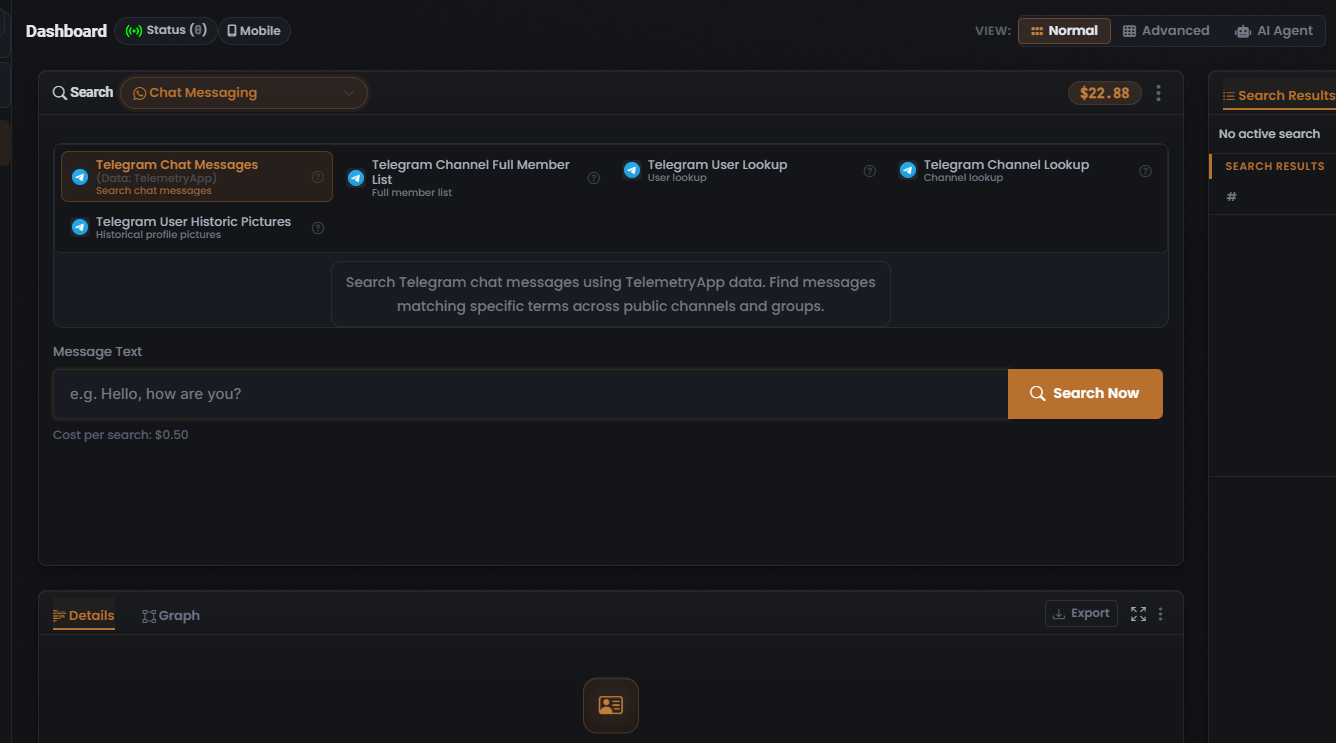
All five Modules in this search type target Telegram, so your choice here is which Telegram lookup to run — message text, a channel, or a user — not which target platform. This shared target, however, is not the same as a shared data source: only the default Module’s data source (TelemetryApp) was captured; the sources behind the other four Modules were not. See the caution below.
When to use it
Section titled “When to use it”Use the Chat Messaging search type when your lead is on Telegram and you want to:
- Search message text across public channels and groups (the Telegram Chat Messages Module, the lead Module, via TelemetryApp).
- Pull a channel’s members — the full member list of a public channel (the Telegram Channel Full Member List Module).
- Look up a user — profile detail for a Telegram user (the Telegram User Lookup Module).
- Look up a channel — profile detail for a Telegram channel (the Telegram Channel Lookup Module).
- See a user’s past avatars — previously used profile pictures for a user (the Telegram User Historic Pictures Module).
This search type exposes five Modules, all targeting Telegram. For the full breakdown of each — its input, cost, and data source — see Chat messaging modules & options.
The end-to-end flow
Section titled “The end-to-end flow”Chat Messaging follows the same search composer flow as every other search in UserSearch — see How UserSearch works for the general model.
- In the composer header, open the Search type selector and choose Chat Messaging.
- Pick a Module from the grid. The grid is single-select: selecting one deselects the others, and the active tile is drawn with a coral-orange highlighted border. Selecting a tile loads its description, its Cost per search line, and its query form. Telegram Chat Messages is the default (lead) Module.
- Enter your identifier in the query field. For the default Module this is Message Text — the phrase you expect to find in public Telegram traffic. Switching Modules changes the expected input to a channel or a user.
- Confirm the Cost per search line beneath the input. With Telegram Chat Messages selected it reads $0.50.
- Select Search Now (the coral-orange button with a magnifier icon) to run the query.
What it costs
Section titled “What it costs”Every Module shows its price on a Cost per search line, denominated in Credits and drawn from your search-credits pool. The one observed cost for this search type is the default Module:
- Telegram Chat Messages — $0.50 (fixed). This is the single observed cost data point for the search type.
- The other four Modules — cost not captured. Do not assume they also cost $0.50; always read the Cost per search line shown on the tile before you run.
See Credits & pricing for the full cost model.
What you get back
Section titled “What you get back”Running a search populates the Search Results panel on the right, with the standard header counters — Found (green), Enriched (orange), and Connections (white) — over a results table whose columns adapt to the Module you ran, plus a Details panel for the selected row. Because the default Module runs against TelemetryApp, the results table’s Data Source column reads TelemetryApp for a Telegram Chat Messages run; the data sources — and therefore the Data Source values — for the other four Modules were not captured.
For how to read and verify those results, see Reading Chat messaging results and the general concept Found, Enriched, Connections and Match Accuracy.
Verified against UserSearch v2.0.20