
The pivot: one entity into a linked graph
A search rarely stays on the entity you started with. You begin with one identifier — a username, an email, a phone number, a face — and each search hands you new values that point somewhere else. A pivot is the move from the entity you hold to a related one, and stringing pivots together is how a single input becomes a linked graph of accounts, people, domains, and infrastructure.
This page explains what a pivot is, the ways to pivot inside the UI, and the routing table that tells you what you can reach from every kind of entity.
What a pivot is
Section titled “What a pivot is”A pivot is moving from one entity to a related one by following a Connection surfaced by a search. The investigative core loop is:
search → enrich → pivot — run a Module against an input entity, let Enrichment expand the Found records with extra metadata, then take one of those newly-surfaced values and search it in another Module or Search type.
Two facts anchor how pivots appear in results (per Lee, 2026-07-08):
- Found means the identifier was located on a site — an account exists there.
- Enriched means UserSearch holds further metadata on that account — for example possible names or linked emails.
Enriched fields are the raw material for a pivot. A name or a linked email surfaced by enrichment is the next entity you feed back into the map. Found tells you where an entity lives; Enriched gives you the new entities to chase.
The ways to pivot in the UI
Section titled “The ways to pivot in the UI”Re-search across Search types (the manual pivot)
Section titled “Re-search across Search types (the manual pivot)”Take a value you obtained from one search — say, an email surfaced while enriching a username — and enter it as the input to a different Search type or Module. This is the workhorse pivot, and it is the reason the map below is organised by input entity. No special control is required: it is the ordinary act of running a second search.
The Google “G” dork
Section titled “The Google “G” dork”A “G” icon shown next to a searched artifact is a Google dork for that artifact. Clicking it opens Google with a preset dork for the value (per Lee, 2026-07-08). This is a pivot out of the platform into an external Google search, not an internal re-search.
The magnifier / enrich icon
Section titled “The magnifier / enrich icon”A separate magnifier / enrich icon appears next to a searched term, beside the Google “G”. Like the “G”, it opens a Google page with a preset dork for that value (per Lee, 2026-07-10) — a second one-click pivot out of the platform into an external Google search. The exact dork template it builds is not documented here.
The AI Agent as a pivot accelerator
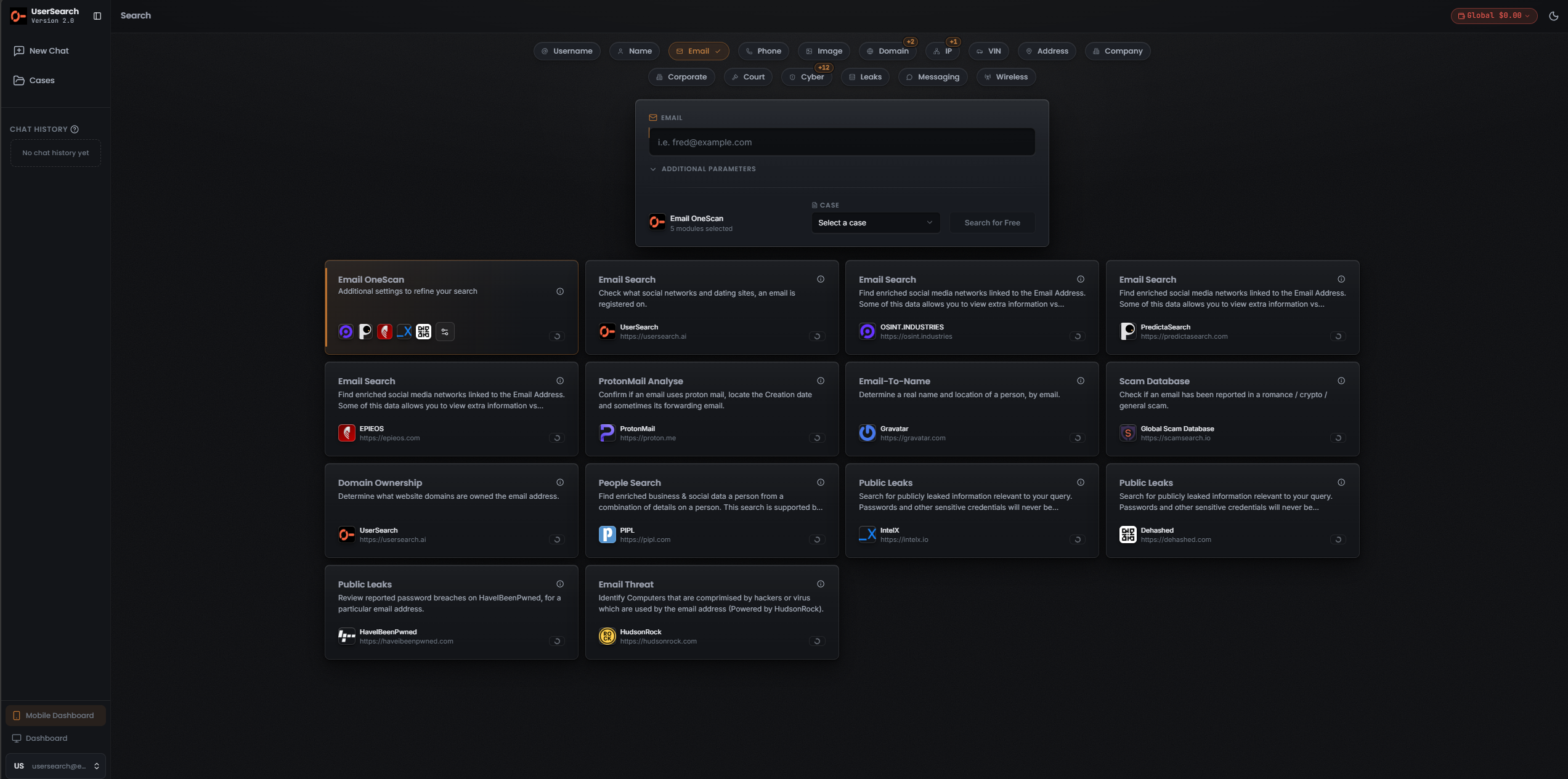
Section titled “The AI Agent as a pivot accelerator”The AI Agent (S.A.R.G.E.) exposes a row of entity-type pills — Username, Name, Email, Phone, Image, Domain, IP, VIN, Address, Company — plus Search type pills for Corporate, Court, Cyber, Leaks, Messaging, and Wireless. It lets you multi-select Modules, so it can chain several of the pivots below conversationally rather than card-by-card.
S.A.R.G.E. is a documented feature despite its v0.3 experimental label (per Lee, 2026-07-08).
The pivot map, by input entity
Section titled “The pivot map, by input entity”The tables below read as a routing table: for each entity you might hold, they list what you can reach and which Search type → Module takes you there.
The How it’s grounded column means:
- Observed — a Module with this input and output is captured in the screenshots.
- Enrich (per Lee) — the onward entity comes from Enrichment; grounded in Lee’s Found / Enriched definitions, but the specific enriched fields in any given run are not yet captured.
Username
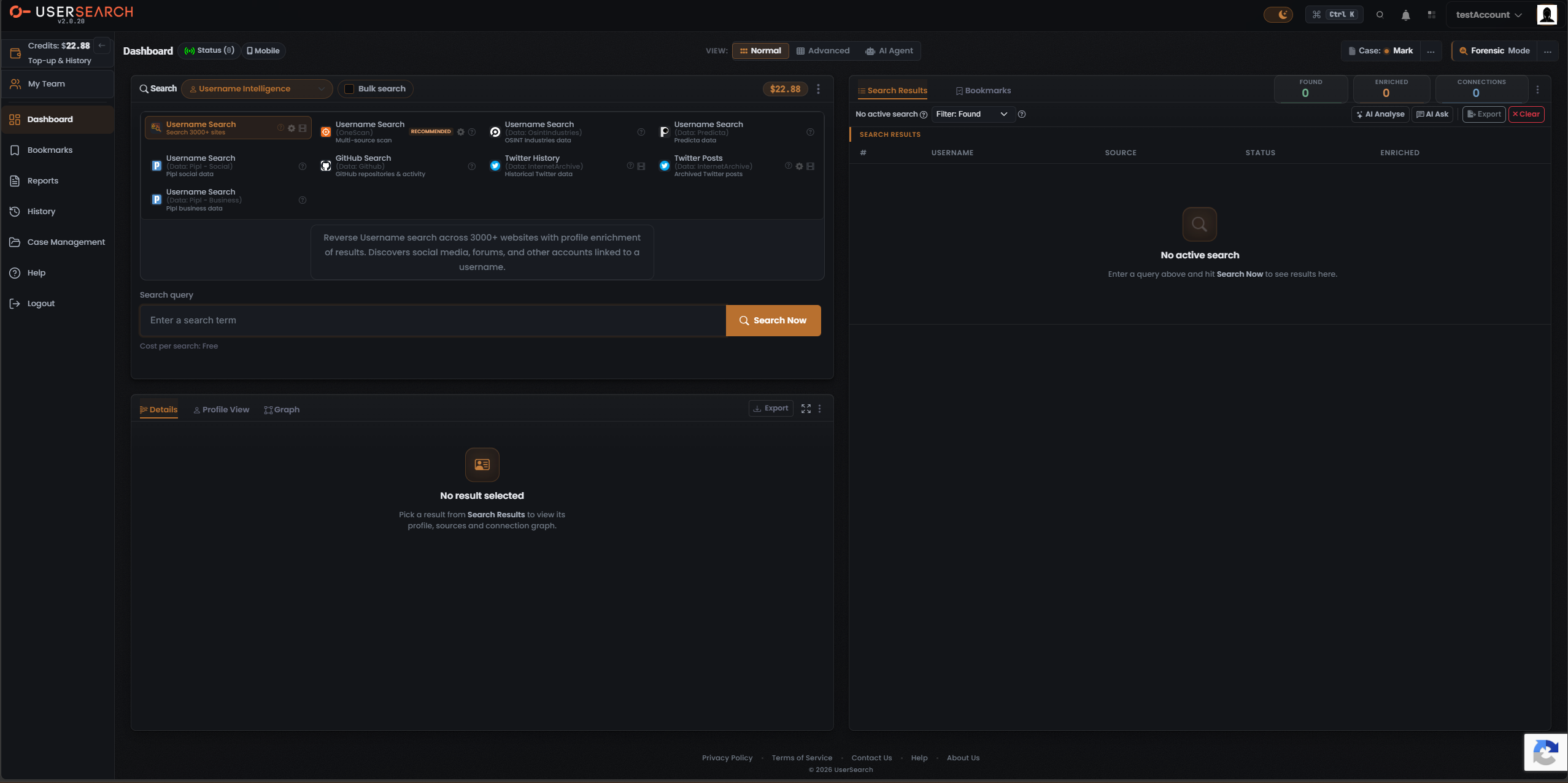
Section titled “Username”Entry search types: Username Intelligence, Public Forums, Chat Messaging; a username is also a field in the People Intelligence person form.
| From a username you can reach | Via Search type → Module | How it’s grounded |
|---|---|---|
| Accounts on 3000+ websites (social media, forums, other linked accounts) | Username Intelligence → Username Search (Search 3000+ sites) | Observed |
| A merged multi-source account footprint | Username Intelligence → Username Search (OneScan) [RECOMMENDED] | Observed |
| data source-specific footprints | Username Intelligence → OSINT Industries / Predicta / Pipl-Social / Pipl-Business Modules | Observed |
| GitHub repositories and activity | Username Intelligence → GitHub Search | Observed |
| Historical / archived Twitter data and posts | Username Intelligence → Twitter History, Twitter Posts | Observed |
| Possible names and linked emails for a found account | Enrichment of the above | Enrich (per Lee) |
| Reddit profile, post/comment history, activity timeline, behavioural insights | Public Forums → Reddit User plus Reddit profile/history Modules | Observed |
| Telegram user/channel details, membership, historic profile pictures | Chat Messaging → Telegram User Lookup / Channel Lookup / Historic Pictures | Observed |
| A full person record (combined with other fields) | People Intelligence → Person Modules (Username is one form field) | Observed |
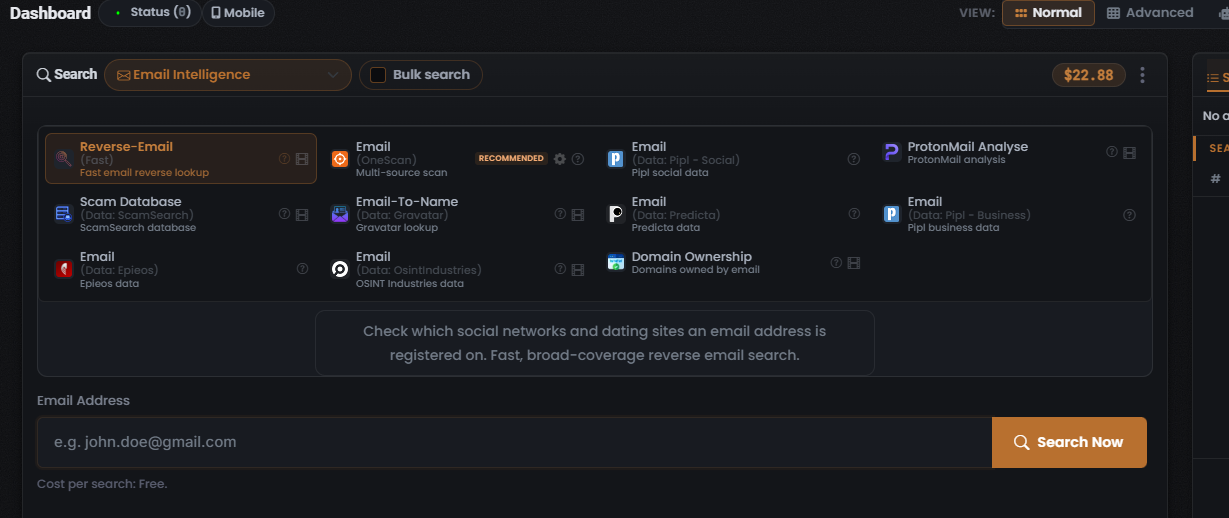
Entry search type: Email Intelligence; also a field in People Intelligence, an accepted term in Court Records free-text, and a Public Leaks entity tab.
| From an email you can reach | Via Search type → Module | How it’s grounded |
|---|---|---|
| Social networks and dating sites the email is registered on | Email Intelligence → Reverse-Email (Fast) | Observed |
| A merged multi-source email footprint | Email Intelligence → Email (OneScan) [RECOMMENDED] | Observed |
| A real name and location (Email → Name) | Email Intelligence → Email-To-Name (Gravatar) | Observed (Gravatar pivot per Lee, 2026-07-08) |
| Domains owned by the email (Email → Domain, reverse-WHOIS) | Email Intelligence → Domain Ownership; Website Forensics → Website Domain Ownership (by Email) | Observed |
| Breach / leak appearances and exposed credentials | Email Intelligence → Scam Database; Public Leaks → HaveIBeenPwned, Dehashed, IntelX, OneScan | Observed |
| ProtonMail confirmation, account creation date, sometimes a forwarding email | Email Intelligence → ProtonMail Analyse | Observed |
| Compromised computers/devices tied to the email | Threat Intelligence → Email Threat (HudsonRock) | Observed |
| A person / social and professional profile | Email Intelligence → Email (Pipl-Social / Pipl-Business / Predicta / Epieos / OSINT Industries); People Intelligence (Email field) | Observed |
| Phone, address, username for the same person | Enrichment / People form cross-fields | Enrich (per Lee) |
Phone number
Section titled “Phone number”Entry search type: Phone Intelligence; also a field in People Intelligence, an accepted term in Court Records, and a Public Leaks entity tab.
| From a phone number you can reach | Via Search type → Module | How it’s grounded |
|---|---|---|
| Identity, address history, and public records (US) | Phone Intelligence → Background Check (US) | Observed |
| A merged multi-source phone footprint | Phone Intelligence → Phone (OneScan) [RECOMMENDED] | Observed |
| Phone-linked identity / enrichment data | Phone Intelligence → OSINT Industries / Pipl-Social / Pipl-Business / Predicta / Epieos | Observed |
| A person record (name, email, address) | People Intelligence → Person Modules (Phone is the lead field) | Observed |
Person / name
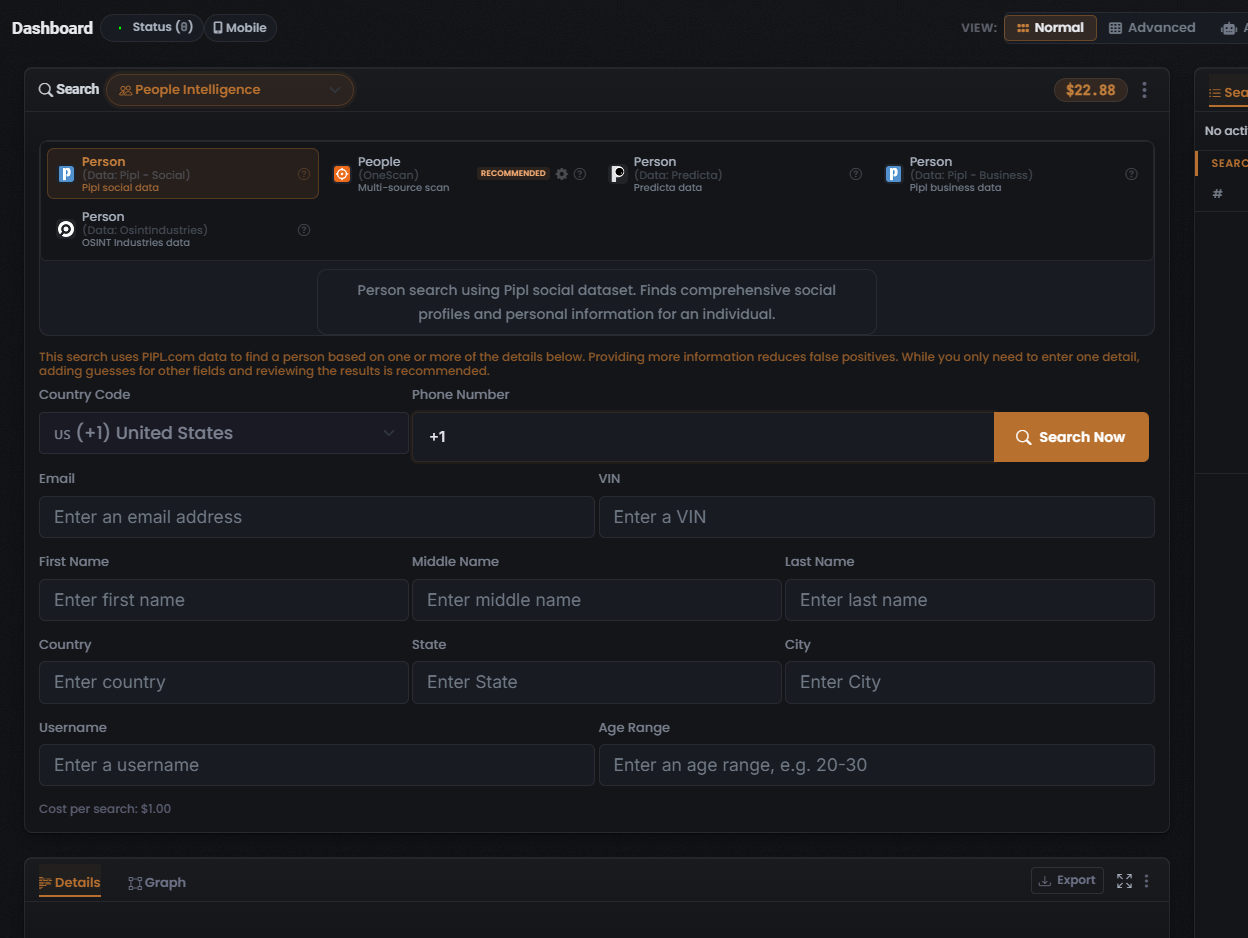
Section titled “Person / name”Entry search type: People Intelligence; a name is also an accepted term in Court Records and appears as Person Sanctions input in Corporate Intelligence.
The People form is multi-field: Country Code + Phone, Email, VIN, First/Middle/Last Name, Country/State/City, Username, and Age Range. Providing more fields reduces false positives; only one field is required. Because it accepts so many entity types as input, People Intelligence is the hub of the pivot map — nearly every other entity can pivot into a person here.
| From a person/name you can reach | Via Search type → Module | How it’s grounded |
|---|---|---|
| Comprehensive social profiles and personal info | People Intelligence → Person (Pipl-Social) | Observed |
| A merged multi-source person record | People Intelligence → People (OneScan) [RECOMMENDED] | Observed |
| data source-specific person data | People Intelligence → Person (Predicta / Pipl-Business / OSINT Industries) | Observed |
| Associated email / phone / username / address | Returned fields / enrichment of the above | Enrich (per Lee) |
| Sanctions / watchlist hits | Corporate Intelligence → Person Sanctions (OpenSanctions) | Observed |
| Court records mentioning the person | Court Records → any Module (free-text name query) | Observed |
Domain / hostname
Section titled “Domain / hostname”Entry search types: Website Forensics, Cyber Intelligence, Threat Intelligence; a Domain entity pill exists in the AI Agent and a Domain entity tab in Public Leaks.
| From a domain you can reach | Via Search type → Module | How it’s grounded |
|---|---|---|
| Current and historical WHOIS ownership and contacts (Domain → Person/email) | Website Forensics → Website Domain Ownership (by Domain) | Observed |
| Historical page snapshots | Website Forensics → Website Change History | Observed |
| Third-party website-intelligence integrations | Website Forensics → 3rd Party Website Lookup | Observed |
| Other sites sharing the same favicon hash (Domain → Domain) | Website Forensics → Search by Favicon | Observed |
| Hosts / IPs for the domain, with ports and services (Domain → IP) | Cyber Intelligence → Find Hosts by Hostname / Domain (Shodan) | Observed |
| Domain reputation / blocklist status | Threat Intelligence → Domain Reputation (SpamHaus) | Observed |
| Infostealer / compromise threat data | Threat Intelligence → Domain Threat (HudsonRock) | Observed |
IP address
Section titled “IP address”Entry search types: Cyber Intelligence, Threat Intelligence; an IP entity pill exists in the AI Agent and IP/CIDR entity tabs in Public Leaks.
| From an IP you can reach | Via Search type → Module | How it’s grounded |
|---|---|---|
| Full host profile: open ports, service banners, web tech, TLS/SSL certs, hostnames, owning organisation, known CVEs (IP → Domain/org) | Cyber Intelligence → IP Host Lookup (Shodan) | Observed |
| Threat indicators — malware, botnets, malicious activity (filterable by Compromised Since year) | Threat Intelligence → Computer/IP Threat (HudsonRock) | Observed |
| IP reputation / blocklist status | Threat Intelligence → IP Reputation (SpamHaus) | Observed |
| Related exposed assets (certs, databases, cameras, ICS, IoT, mail servers) sharing infra | Cyber Intelligence → the other Shodan Modules (via a custom query) | Observed |
Image / face
Section titled “Image / face”Entry search type: Picture; an Image entity pill exists in the AI Agent, with an Image attachment control in the S.A.R.G.E. composer.
| From an image you can reach | Via Search type → Module | How it’s grounded |
|---|---|---|
| Manipulation / AI-generation forensic verdict | Picture → Fake Image Check | Observed |
| A merged multi-source image scan | Picture → Image (OneScan) [RECOMMENDED] | Observed |
| Face matches across the web (profiles / URLs) (Face → accounts) | Picture → Face Search (FaceCheck.id) | Observed |
| Adult-site face matches | Picture → Face Search (18+) (CamGirlFinder) | Observed |
| Geolocation of where the image was taken (Image → location) | Picture → Image Geo-location (Picarta), Image Geo-location (FindPicLocation) | Observed |
| Reverse-image matches / where else the image appears | Picture → Image (TinEye), Image (Google Lens) | Observed |
Cryptocurrency wallet address
Section titled “Cryptocurrency wallet address”Entry search type: Cryptocurrency; a Bitcoin entity tab exists in Public Leaks, and Cryptocurrency Infrastructure is a Cyber Module.
| From a wallet address you can reach | Via Search type → Module | How it’s grounded |
|---|---|---|
| Transaction history, balance, associated metadata | Cryptocurrency → Address Lookup (accepts EVM / 0x-style addresses) | Observed |
| Websites associated with the wallet (Wallet → Domain) | Cryptocurrency → Websites by Address | Observed |
| Leak/breach records referencing the wallet | Public Leaks → any Module, Bitcoin entity tab | Observed |
| Exposed crypto infrastructure hosts | Cyber Intelligence → Cryptocurrency Infrastructure (Shodan) | Observed |
Vehicle registration / VIN
Section titled “Vehicle registration / VIN”Entry search type: Vehicle Lookup; VIN is also a field in the People form.
| From a registration / VIN you can reach | Via Search type → Module | How it’s grounded |
|---|---|---|
| Make, model, MOT history, tax status (UK) | Vehicle Lookup → Vehicle Lookup (UK Only, Enriched) | Observed |
| US vehicle details | Vehicle Lookup → Vehicle Lookup (US Only, Enriched) | Observed |
| The vehicle owner as a person (Vehicle → Person) | Vehicle Lookup → Vehicle Owner (Pipl-Social), Vehicle Owner (Pipl-Business) | Observed |
| A person record seeded by the VIN | People Intelligence → Person Modules (VIN field) | Observed |
Company / organisation
Section titled “Company / organisation”Entry search type: Corporate Intelligence; a Company entity pill and a Corporate Search type pill exist in the AI Agent.
| From a company you can reach | Via Search type → Module | How it’s grounded |
|---|---|---|
| Registration details, directors, filings, corporate structure (Company → Person) | Corporate Intelligence → Company Search (OpenCorporates), Company Search (CompaniesHouse-UK) | Observed |
| Named directors / officers | Corporate Intelligence → Director Search (OpenCorporates), Officer Search (CompaniesHouse-UK) | Observed |
| Companies at an address (Address → Company) | Corporate Intelligence → Address Enquiry (OpenCorporates) | Observed |
| Legal Entity Identifier records | Corporate Intelligence → LEI Search (GLEIF) | Observed |
| Trademark records | Corporate Intelligence → Trademark Search (OpenCorporates) | Observed |
| US SEC filings (full-text) | Corporate Intelligence → SEC Full-Text Search (SEC-USA) | Observed |
| Sanctions / watchlist hits (company or person) | Corporate Intelligence → Company Sanctions, Person Sanctions (OpenSanctions) | Observed |
Wireless identifiers (BSSID / SSID / ZIP)
Section titled “Wireless identifiers (BSSID / SSID / ZIP)”Entry search type: Wireless Device, all backed by WiGLE (the wardriving database).
| From a wireless identifier you can reach | Via Search type → Module | How it’s grounded |
|---|---|---|
| Bluetooth device details and geolocation (from a BSSID/MAC) | Wireless Device → Bluetooth by BSSID | Observed |
| Bluetooth devices by area | Wireless Device → Bluetooth by ZIP, Bluetooth by SSID | Observed |
| WiFi network details and geolocation (from a BSSID/MAC) | Wireless Device → WiFi by BSSID | Observed |
| WiFi networks by area / name | Wireless Device → WiFi by ZIP, WiFi by SSID | Observed |
Free-text / mixed-entity entry points
Section titled “Free-text / mixed-entity entry points”Some Search types accept a broad free-text query rather than one entity type, so they act as catch-all pivot targets.
| Entry point | Accepts | Reaches |
|---|---|---|
| Court Records free-text | phrase, email, username, phone number, name, address, or other term | court records across UK / US / Russia / Canada / France data sources (or OneScan across all) |
| Public Leaks query + entity tabs | value scoped by tab: All, Email, Phone, IP, CIDR, MAC, Domain, URL, Bitcoin, IBAN, Card Number, and more | exposed credentials / personal data from breaches (IntelX / Dehashed / HaveIBeenPwned / OneScan) |
| Product Intelligence query | product / topic term | Google Trends, Trending Now, Scholar, Patents, Ad Creatives, Apple Apps, Events |
Backbone pivots to remember
Section titled “Backbone pivots to remember”A handful of pivots do most of the work in real searches. Learn these first:
- Email → Name via Email-To-Name (Gravatar) — resolves an email to a real name and location (Gravatar pivot per Lee, 2026-07-08).
- Email → owned domains via Domain Ownership / Website Domain Ownership (by Email) — reverse-WHOIS from an email to the domains it registered.
- Email → breaches via Public Leaks HaveIBeenPwned / Dehashed / IntelX (or OneScan) — exposed credentials and breach appearances.
- Username → 3000+ sites via Username Search (Search 3000+ sites) — the broadest single fan-out, discovering social, forum, and other accounts linked to a username.
- Google “G” dork on any searched artifact — one click opens Google with a preset dork for that value (per Lee, 2026-07-08).
- People Intelligence multi-field form — the convergence hub: phone, email, VIN, name, location, username, and age range all funnel into one person record.
OneScan and pivoting
Section titled “OneScan and pivoting”Most Search types offer a OneScan Module marked RECOMMENDED that fans a single input out across several data sources at once and merges results, so the Data Source column shows which data source each row came from. OneScan front-loads the search step of the loop across many sources before you pivot.
Its cost is dynamic: a OneScan search costs the sum of all the data sources left selected in the “Choose Data Source” modal, so the displayed range moves as sources are toggled (per Lee, 2026-07-08). By contrast, non-OneScan search type searches are fixed-priced (per Lee, 2026-07-08); several are free — including Username 3000+ sites, Reverse-Email, Address Lookup, and Product Trends.
What this map does not assert
Section titled “What this map does not assert”Verified against UserSearch v2.0.20